Fabric Data Days starts November 4th!
Advance your Data & AI career with 50 days of live learning, dataviz contests, hands-on challenges, study groups & certifications and more!
Get registered- Power BI forums
- Get Help with Power BI
- Desktop
- Service
- Report Server
- Power Query
- Mobile Apps
- Developer
- DAX Commands and Tips
- Custom Visuals Development Discussion
- Health and Life Sciences
- Power BI Spanish forums
- Translated Spanish Desktop
- Training and Consulting
- Instructor Led Training
- Dashboard in a Day for Women, by Women
- Galleries
- Data Stories Gallery
- Themes Gallery
- Contests Gallery
- QuickViz Gallery
- Quick Measures Gallery
- Visual Calculations Gallery
- Notebook Gallery
- Translytical Task Flow Gallery
- TMDL Gallery
- R Script Showcase
- Webinars and Video Gallery
- Ideas
- Custom Visuals Ideas (read-only)
- Issues
- Issues
- Events
- Upcoming Events
Get Fabric Certified for FREE during Fabric Data Days. Don't miss your chance! Request now
- Power BI forums
- Forums
- Get Help with Power BI
- DAX Commands and Tips
- Need help to Get latest records from table data by...
- Subscribe to RSS Feed
- Mark Topic as New
- Mark Topic as Read
- Float this Topic for Current User
- Bookmark
- Subscribe
- Printer Friendly Page


- Mark as New
- Bookmark
- Subscribe
- Mute
- Subscribe to RSS Feed
- Permalink
- Report Inappropriate Content
Need help to Get latest records from table data by adding flag
Need to get latest record based on each file group on below conditions.
PBIX URL : https://drive.google.com/file/d/1YNkpQQKhtOejgPtj48bmS6v6MyadYnfN/view?usp=sharing
1.Sourcesystem="DB" is latest.
2. if file is not available in Sourcesystem="DB" ,check Sourcesystem="App" and Sourcesystem="app" and stepdescription = "Import " is latest.
3. IF stepdescription = "Import " also file not available. stepdescription = "Transfer " is latest.
Pls find below screen shot for source data and highlighted color indicates expected output.
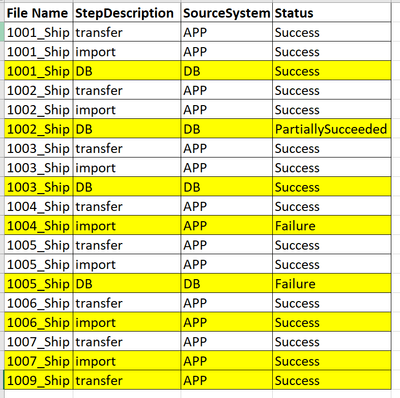
Tried below script but expected result not coming . need help.
Solved! Go to Solution.


- Mark as New
- Bookmark
- Subscribe
- Mute
- Subscribe to RSS Feed
- Permalink
- Report Inappropriate Content
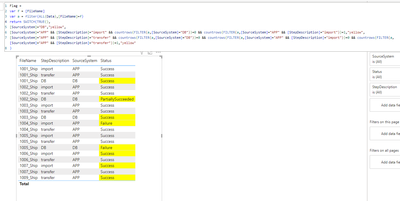
Flag =
var f = [FileName]
var a = filter(ALL(Data),[FileName]=f)
return SWITCH(TRUE(),
[SourceSystem]="DB","yellow",
[SourceSystem]="APP" && [StepDescription]="import" && countrows(FILTER(a,[SourceSystem]="DB"))=0 && countrows(FILTER(a,[SourceSystem]="APP" && [StepDescription]="import"))=1,"yellow",
[SourceSystem]="APP" && [StepDescription]="transfer" && countrows(FILTER(a,[SourceSystem]="DB"))=0 && countrows(FILTER(a,[SourceSystem]="APP" && [StepDescription]="import"))=0 && countrows(FILTER(a,[SourceSystem]="APP" && [StepDescription]="transfer"))=1,"yellow"
)
- Mark as New
- Bookmark
- Subscribe
- Mute
- Subscribe to RSS Feed
- Permalink
- Report Inappropriate Content
You cannot replace column values in DAX. This would need to be done in Power Query or in the source system.
- Mark as New
- Bookmark
- Subscribe
- Mute
- Subscribe to RSS Feed
- Permalink
- Report Inappropriate Content
@lbendlin Need to add in Power BI side only. atleast is there any way to calculate new status column using current status column. Adding only new status column also fine.
- Mark as New
- Bookmark
- Subscribe
- Mute
- Subscribe to RSS Feed
- Permalink
- Report Inappropriate Content
Adding a new column would be ok.
New Status =
var f = [FileName]
var a = filter(ALL(Data),[FileName]=f)
return SWITCH(TRUE(),
[SourceSystem]="APP" && [StepDescription]="import" && countrows(FILTER(a,[SourceSystem]="DB"))=0 && countrows(FILTER(a,[SourceSystem]="APP" && [StepDescription]="import"))=1,"In Progress",
[Status])
- Mark as New
- Bookmark
- Subscribe
- Mute
- Subscribe to RSS Feed
- Permalink
- Report Inappropriate Content
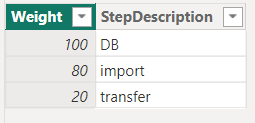
Thanks for responce.one of the scenario failed above query. below script working fine.

- Mark as New
- Bookmark
- Subscribe
- Mute
- Subscribe to RSS Feed
- Permalink
- Report Inappropriate Content
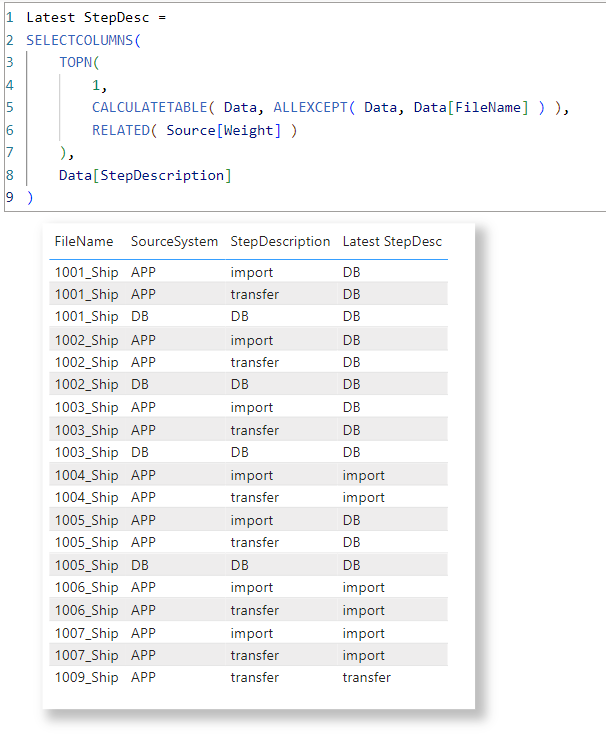
- Mark as New
- Bookmark
- Subscribe
- Mute
- Subscribe to RSS Feed
- Permalink
- Report Inappropriate Content
Flag =
var f = [FileName]
var a = filter(ALL(Data),[FileName]=f)
return SWITCH(TRUE(),
[SourceSystem]="DB","yellow",
[SourceSystem]="APP" && [StepDescription]="import" && countrows(FILTER(a,[SourceSystem]="DB"))=0 && countrows(FILTER(a,[SourceSystem]="APP" && [StepDescription]="import"))=1,"yellow",
[SourceSystem]="APP" && [StepDescription]="transfer" && countrows(FILTER(a,[SourceSystem]="DB"))=0 && countrows(FILTER(a,[SourceSystem]="APP" && [StepDescription]="import"))=0 && countrows(FILTER(a,[SourceSystem]="APP" && [StepDescription]="transfer"))=1,"yellow"
)
- Mark as New
- Bookmark
- Subscribe
- Mute
- Subscribe to RSS Feed
- Permalink
- Report Inappropriate Content
Above Dax script working Good. Thanks for your responce @lbendlin .
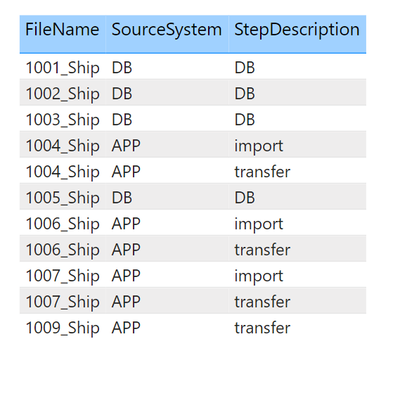
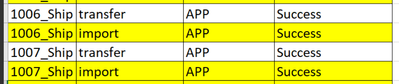
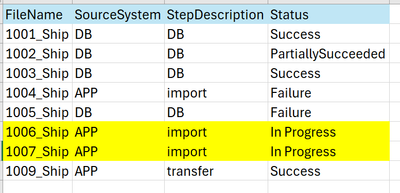
One small change in the requirement. If Sourcesystem="app" and stepdescription = "transfer " , Sourcesystem="app" and stepdescription = "Import " in both cases files got "success" file should move to Sourcesystem="DB". but there's no entry to track where file is exactly. for file 1006 and 1007 i should consider latest status as "In progres". how should i achive in dax . pls help me.
- Mark as New
- Bookmark
- Subscribe
- Mute
- Subscribe to RSS Feed
- Permalink
- Report Inappropriate Content
Please provide sample data that fully covers your issue.
Please show the expected outcome based on the sample data you provided.
- Mark as New
- Bookmark
- Subscribe
- Mute
- Subscribe to RSS Feed
- Permalink
- Report Inappropriate Content
Sure, Plese find PBIX file : https://drive.google.com/file/d/1aVxHeFh_0T1TpNeMqIzlzAo-dXveYiN0/view?usp=sharing
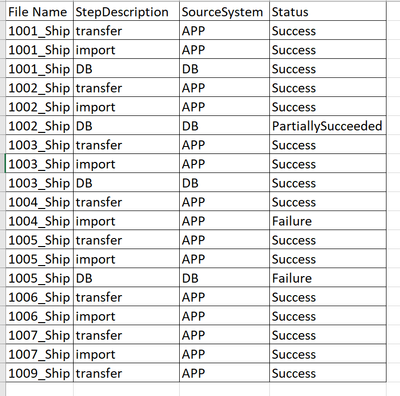
Source data same as above.reference pls find below screen shot and attched PBIX file .
Out Put :

Helpful resources

Fabric Data Days
Advance your Data & AI career with 50 days of live learning, contests, hands-on challenges, study groups & certifications and more!

Power BI Monthly Update - October 2025
Check out the October 2025 Power BI update to learn about new features.

FabCon Atlanta 2026
Join us at FabCon Atlanta, March 16-20, for the ultimate Fabric, Power BI, AI and SQL community-led event. Save $200 with code FABCOMM.

| User | Count |
|---|---|
| 8 | |
| 6 | |
| 5 | |
| 5 | |
| 4 |


| User | Count |
|---|---|
| 25 | |
| 16 | |
| 8 | |
| 7 | |
| 7 |


