Join us at FabCon Atlanta from March 16 - 20, 2026, for the ultimate Fabric, Power BI, AI and SQL community-led event. Save $200 with code FABCOMM.
Register now!The Power BI Data Visualization World Championships is back! Get ahead of the game and start preparing now! Learn more
Hi,
Power BI
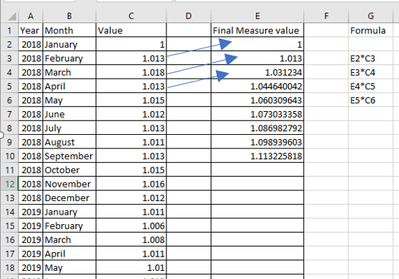
Need help on creating measure on running multiplication value from Previous value
Using Date hirerachy ( Year -> Month in my Power BI table visual)
below is the sample screen shot as output.
Solved! Go to Solution.
Hi, @SP_1
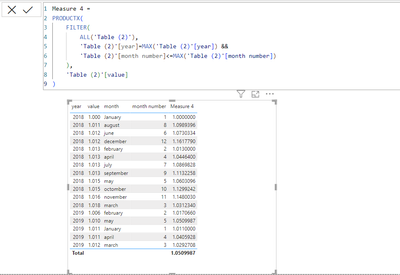
you need month number column in your table
try below measure
Measure 4 =
PRODUCTX(
FILTER(
ALL('Table (2)'),
'Table (2)'[year]=MAX('Table (2)'[year]) &&
'Table (2)'[month number]<=MAX('Table (2)'[month number])
),
'Table (2)'[value]
)
and change decimal number of measure to 5
hi @SP_1
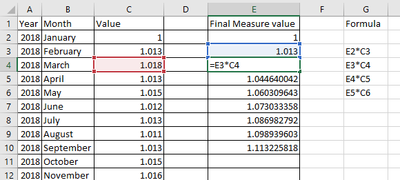
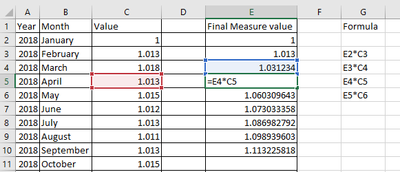
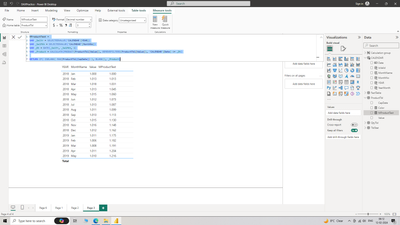
Another method, I have used Date table(Calendar) and Fact table(ProductTbl), linked one to many relationship. To sort the results I have also added YearMonth to table but changed font color to white so it is not visible, MonthYear or date is needed to show results sorted, if sort is not required, you can skip this step.
Hi, @SP_1
you need month number column in your table
try below measure
Measure 4 =
PRODUCTX(
FILTER(
ALL('Table (2)'),
'Table (2)'[year]=MAX('Table (2)'[year]) &&
'Table (2)'[month number]<=MAX('Table (2)'[month number])
),
'Table (2)'[value]
)
and change decimal number of measure to 5
Hi @SP_1
Please check this https://community.fabric.microsoft.com/t5/DAX-Commands-and-Tips/Cumulative-Calculation-Multiplying-V...
Regards,
Ritesh
Hi @ribisht17
I already tried but its not working for date hierarchy (Year / Month)
Thanks
Need DAX code
The Power BI Data Visualization World Championships is back! Get ahead of the game and start preparing now!
| User | Count |
|---|---|
| 19 | |
| 13 | |
| 8 | |
| 4 | |
| 4 |
| User | Count |
|---|---|
| 29 | |
| 19 | |
| 18 | |
| 11 | |
| 10 |