cancel
Showing results for 
Search instead for 
Did you mean: 

The Power BI Data Visualization World Championships is back! Get ahead of the game and start preparing now! Learn more

Reply
Shilp1rin-gue
Frequent Visitor

Multiplying 3 columns

Hello everybody i hope that you are doing well , I'm a beginner on Dax I NEED SOME HELP PLEASE ,I have a table TRANSACTIONS and the other table for EXCHANGE RATE , i related them with *..1 , I want to calculate a multiplication with 3 columns

this is the content of Exchange rate table 

Ident          Date     currency          exchange rate 
1                28/12        USD                    9,53
2                28/12        EUR                    10,93 

and this is the transactions table : 

Ident            Price                  Quantity      Devise Règ
  1                  102,7                  10                  EUR
  2                 104 ,08                30                 MAD


what I want to do is multiply :  Price * Quantity * Taux de change with a condition that verify 

if Devise Règ is different to "MAD" then I will do the calcul with this : Price * Quantity * exchange rate

            = 102,7 * 10 * 10,93

else : simply multiply : Price * Quantity 

             = 104,08 * 30


I tried this but it doesn't twork : 

Measure = SUM(' TRANSACTIONS'[Quantity]) * SUM(' TRANSACTIONS'[Price]) * CALCULATE(SUM(Exchange rate [exchange rate  ]) , FILTER(' TRANSACTIONS' , ' TRANSACTIONS'[Devise Règ] <> "MAD" ))


Thank you in advance

6 REPLIES 6
Anonymous
Not applicable

Hi @Shilp1rin-gue,


I tried doing it using Calculated Column. Below is the data that I took.


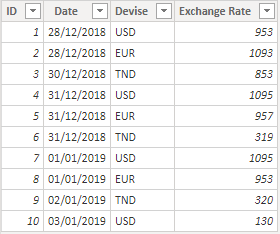
Exchange Rate Table:

Exchange Rate Table.PNG


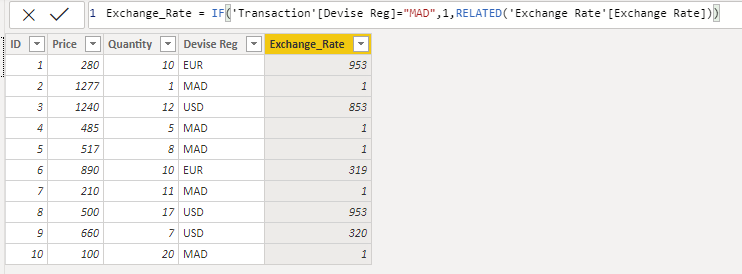
Transaction Table:

Transaction Table.PNG


Assuming a relationship exists between the two tables, I created a calculated column in Transaction table as below:

Image1.PNG


This calculated column i.e. "Exchange_Rate" has value of "Exchange Rate" column from Exchange Rate table if Devise Reg is not MAD else it is 1.


Now, I created a measure using Price, Quantity and calculated column "Exchange_Rate" as below:

Measure Expression.PNG


I hope this is what you were looking for.


Please mark this post as solution if it solved your purpose.

Thanks 🙂

vivran22
Community Champion
Community Champion

Hello @Shilp1rin-gue ,


I am not sure on which column you have created the relationship, hence the following solution is without relationship


You may try this:

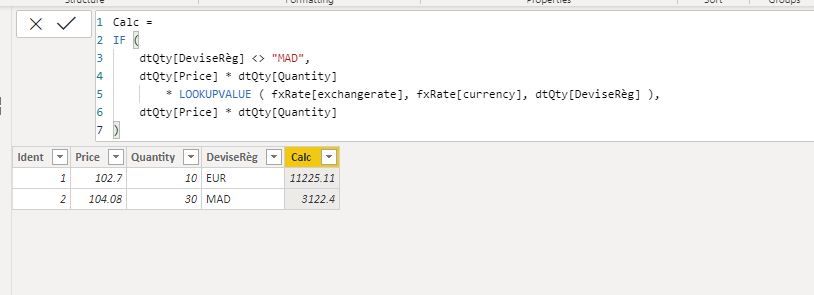
For Calculated Column


Calc = 
IF (
    dtQty[DeviseRèg] <> "MAD",
    dtQty[Price] * dtQty[Quantity]
        * LOOKUPVALUE ( fxRate[exchangerate], fxRate[currency], dtQty[DeviseRèg] ),
    dtQty[Price] * dtQty[Quantity]
)


1.JPG


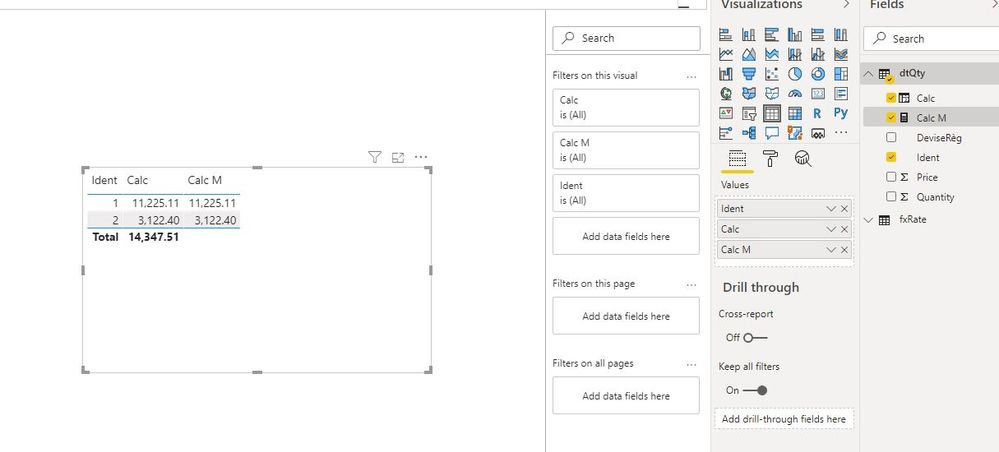
For Measure:


Calc M = 
VAR _Calc_MAD =
    SUMX (
        FILTER ( dtQty, dtQty[DeviseRèg] = "MAD" ),
        dtQty[Price] * dtQty[Quantity]
    )
VAR _Calc =
    SUMX (
        FILTER ( dtQty, dtQty[DeviseRèg] <> "MAD" ),
        dtQty[Price] * dtQty[Quantity]
            * LOOKUPVALUE ( fxRate[exchangerate], fxRate[currency], dtQty[DeviseRèg] )
    )
VAR _Return =
    IF (
        HASONEVALUE ( dtQty[Ident] ),
        IF ( SELECTEDVALUE ( dtQty[DeviseRèg] ) = "MAD", _Calc_MAD, _Calc )
    )
RETURN
    _Return


2.JPG


Cheers!

Vivek


If it helps, please mark it as a solution
Kudos would be a cherry on the top 🙂 (Hit the thumbs up button!)


If it doesn't, then please share a sample data along with the expected results (preferably an excel file and not an image)

https://www.vivran.in/
Connect on LinkedIn
Follow on Twitter

thank you for your reply, i related them with ident 1..* , 1 from EXCHANGE TABLE to * TRANSACTIONS  ,

for the column expression, you show me it gave 

"A table of multiple values was supplied where a single value was expected" :don't know why I think because I have many rows or the expression must be changed actually I'm a beginner I'm still confused 

 and the measure it gave nothing 


@Shilp1rin-gue 


Can you share more sample data to get a better understanding?


Cheers!
Vivek

Visit my blog:
vivran.in/my-blog

Feel free to email me for any BI needs .
Connect on LinkedIn
Follow on Twitter


Helpful resources

Announcements
Power BI DataViz World Championships

Power BI Dataviz World Championships

The Power BI Data Visualization World Championships is back! Get ahead of the game and start preparing now!

November Power BI Update Carousel

Power BI Monthly Update - November 2025

Check out the November 2025 Power BI update to learn about new features.

FabCon Atlanta 2026 carousel

FabCon Atlanta 2026

Join us at FabCon Atlanta, March 16-20, for the ultimate Fabric, Power BI, AI and SQL community-led event. Save $200 with code FABCOMM.