This time we’re going bigger than ever. Fabric, Power BI, SQL, AI and more. We're covering it all. You won't want to miss it.
Learn moreLevel up your Power BI skills this month - build one visual each week and tell better stories with data! Get started
I need help on Conditional Formatting!
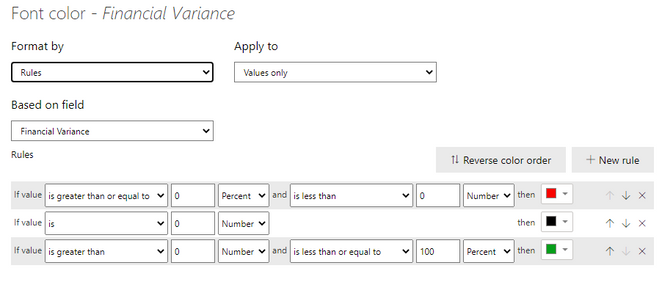
I have a measure with multiple Data formats Such as ( Number, Currency, and Percent) . I would like to setup conditional formating to show any value negative in Red and Any value >= 0 in Green.
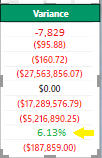
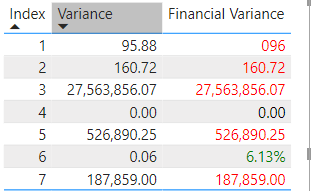
However, at the bottom you can see that My First Number that is not Currency "0,00" and the Last one is Percent "0.00%" they stayed black . Is there any way to change those numbers into Red if they are Negative or Green if >=1 ?
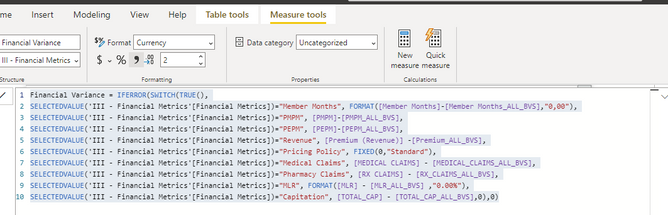
Financial Variance = IFERROR(SWITCH(TRUE(),
SELECTEDVALUE('III - Financial Metrics'[Financial Metrics])="Member Months", FORMAT([Member Months]-[Member Months_ALL_BVS],"0,00"),
SELECTEDVALUE('III - Financial Metrics'[Financial Metrics])="PMPM", [PMPM]-[PMPM_ALL_BVS],
SELECTEDVALUE('III - Financial Metrics'[Financial Metrics])="PEPM", [PEPM]-[PEPM_ALL_BVS],
SELECTEDVALUE('III - Financial Metrics'[Financial Metrics])="Revenue", [Premium (Revenue)] -[Premium_ALL_BVS],
SELECTEDVALUE('III - Financial Metrics'[Financial Metrics])="Pricing Policy", FIXED(0,"Standard"),
SELECTEDVALUE('III - Financial Metrics'[Financial Metrics])="Medical Claims", [MEDICAL CLAIMS] - [MEDICAL_CLAIMS_ALL_BVS],
SELECTEDVALUE('III - Financial Metrics'[Financial Metrics])="Pharmacy Claims", [RX CLAIMS] - [RX_CLAIMS_ALL_BVS],
SELECTEDVALUE('III - Financial Metrics'[Financial Metrics])="MLR", FORMAT([MLR] - [MLR_ALL_BVS] ,"0.00%"),
SELECTEDVALUE('III - Financial Metrics'[Financial Metrics])="Capitation", [TOTAL_CAP] - [TOTAL_CAP_ALL_BVS],0),0)
My Conditional Formatting:
My result:
Desired Result:
Solved! Go to Solution.
Hi, @NilR ;
I found the type of Financial Variance is text because here use FORMAT().
so if coniditonal format is rules, may be cause error. I think you could create other measure as Color based on a calculation.
Such as:
Measure = IF(CONTAINSSTRING([Financial Variance],"%"),"Green",IF([Financial Variance]=0,"Black","Red"))
The final output is shown below:
https://docs.microsoft.com/en-us/power-bi/create-reports/desktop-conditional-table-formatting
Best Regards,
Community Support Team _ Yalan Wu
If this post helps, then please consider Accept it as the solution to help the other members find it more quickly.
Hi, @NilR ;
I found the type of Financial Variance is text because here use FORMAT().
so if coniditonal format is rules, may be cause error. I think you could create other measure as Color based on a calculation.
Such as:
Measure = IF(CONTAINSSTRING([Financial Variance],"%"),"Green",IF([Financial Variance]=0,"Black","Red"))
The final output is shown below:
https://docs.microsoft.com/en-us/power-bi/create-reports/desktop-conditional-table-formatting
Best Regards,
Community Support Team _ Yalan Wu
If this post helps, then please consider Accept it as the solution to help the other members find it more quickly.
Thank you very much! 🙂
@NilR , The last Percent , should be number
Also you can try color measure
How to do conditional formatting by measure and apply it on pie? : https://youtu.be/RqBb5eBf_I4
I am not coloring my metrics, I want to color them if it is negative then turn RED or if it is positive Then Green.
Check out the April 2026 Power BI update to learn about new features.
Sign up to receive a private message when registration opens and key events begin.
If you have recently started exploring Fabric, we'd love to hear how it's going. Your feedback can help with product improvements.
| User | Count |
|---|---|
| 3 | |
| 3 | |
| 3 | |
| 3 | |
| 2 |
| User | Count |
|---|---|
| 8 | |
| 8 | |
| 7 | |
| 6 | |
| 6 |