Join us at FabCon Atlanta from March 16 - 20, 2026, for the ultimate Fabric, Power BI, AI and SQL community-led event. Save $200 with code FABCOMM.
Register now!The Power BI Data Visualization World Championships is back! Get ahead of the game and start preparing now! Learn more
Hi,
I try to generate month to date based on my customized logic.
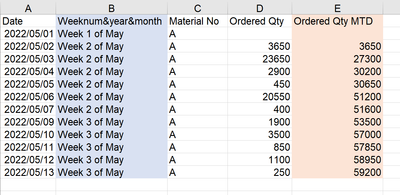
As below, I would like to generate a measure in "Ordered Qty MTD" based on "Weeknum&year&month" column which is generated based on "Date" column. In the visualization, I tried to use time inteliigence, but still fail. Wonder if you could help?
My intention is to only list down by "Weeknum&year&month", "Material No", "Ordered Qty" and "Ordered Qty MTD" columns without showing date, but time intelligence dax would not allow to do so. Thanks.
Solved! Go to Solution.
Hi @Anonymous
Have you had the chance to check my solution?
Hi @Anonymous
Please try
Qty MTD =
VAR CurrentDate =
MAX ( TableName[Date] )
VAR StartOfMonth =
DATE ( YEAR ( CurrentDate ), MONTH ( CurrentDate ), 1 )
RETURN
CALCULATE (
SUM ( TableName[Ordered Qty] ),
ALLEXCEPT ( TableName, TableName[Material No] ),
TableName[Date] <= CurrentDate,
TableName[Date] >= StartOfMonth
)
Hi @Anonymous
Have you had the chance to check my solution?
thanks for helping. It works fine.
@Anonymous
Do you have a datetable? is [Weeknum&year&month] a column? In which table?
Hi @tamerj1
This is the only table I have. I made "Weeknum&year&month" column on my own.
They are all in this table. Thanks
| Date | Weeknum&year&month | Material No | Ordered Qty |
| 2022/05/01 | Week 1 of May | A | 0 |
| 2022/05/02 | Week 2 of May | A | 3650 |
| 2022/05/03 | Week 2 of May | A | 23650 |
| 2022/05/04 | Week 2 of May | A | 2900 |
| 2022/05/05 | Week 2 of May | A | 450 |
| 2022/05/06 | Week 2 of May | A | 20550 |
| 2022/05/07 | Week 2 of May | A | 400 |
| 2022/05/09 | Week 3 of May | A | 1900 |
| 2022/05/10 | Week 3 of May | A | 3500 |
| 2022/05/11 | Week 3 of May | A | 850 |
| 2022/05/12 | Week 3 of May | A | 1100 |
| 2022/05/13 | Week 3 of May | A | 250 |
The Power BI Data Visualization World Championships is back! Get ahead of the game and start preparing now!
| User | Count |
|---|---|
| 19 | |
| 13 | |
| 8 | |
| 4 | |
| 4 |
| User | Count |
|---|---|
| 29 | |
| 19 | |
| 17 | |
| 11 | |
| 10 |