Join us at FabCon Atlanta from March 16 - 20, 2026, for the ultimate Fabric, Power BI, AI and SQL community-led event. Save $200 with code FABCOMM.
Register now!The Power BI Data Visualization World Championships is back! Get ahead of the game and start preparing now! Learn more
Hello all,
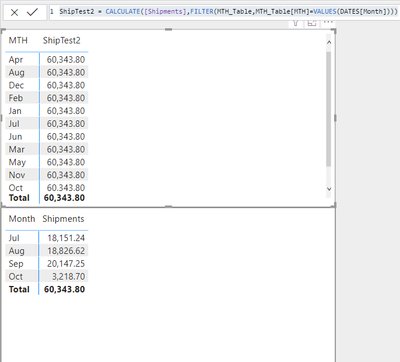
Could you please help me get this DAX formula working?
ShipTest2 = CALCULATE([Shipments],FILTER(MTH_Table,MTH_Table[MTH]=VALUES(DATES[Month])))I need to have the result in the first matrix the same as in the second matrix. I was not able to figure out how to separate the numbers for the first table into months - the column MTH in MTH_table has no relationship with Month in DATES table.
The only way I was able to get this "working" was to create 12 separate measures for each month which is not very efficient, I'd say.
Please don't get into why I ask this stupid question. 😄 I need to further include in the calculation another measure with another date table.
I apologize if the solution is already here somewhere, I was not able to find it.
Solved! Go to Solution.
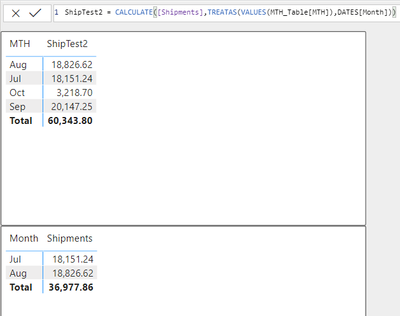
@Tomfiki can you please try this
ShipTest2 = CALCULATE([Shipments], TREATAS(VALUES(MTH_Table[MTH_Table]),DATES[Month]))
@Tomfiki have a read of this https://www.sqlbi.com/articles/propagate-filters-using-treatas-in-dax/
If there is no relationship, you can use TREATAS/CONTAINS/INTERSECT
The basic way TREATAS works as
CALCULATE(<targetMeasure>,TREATAS(VALUES/SUMMARZE(<lookupColumn>),<targetColumn>))
Translating the above
| XAxis | Measure |
|----------------|-----------------------------------------------------|
| Axis from tbl1 | CALCULATE(<AggregateonDATES[value]>, |
| | TREATAS(VALUES/SUMMARZE(<MTH[MTH]>),<Dates[Date]>)) |
| Axis from tbl2 | CALCULATE(<AggregateonMTH[value]>, |
| | TREATAS(VALUES/SUMMARZE(<Dates[Date]>),<MTH[MTH]>))|
Ok, perfect. Thanks again and have a nice evening. 🙂
@Tomfiki can you please try this
ShipTest2 = CALCULATE([Shipments], TREATAS(VALUES(MTH_Table[MTH_Table]),DATES[Month]))
@smpa01 Thank you for the reply, it works great!
Could you advise how to adjust it so if I filter something in DATES[Month] it will also reflect in the result?
Check out the November 2025 Power BI update to learn about new features.
Advance your Data & AI career with 50 days of live learning, contests, hands-on challenges, study groups & certifications and more!
| User | Count |
|---|---|
| 21 | |
| 10 | |
| 9 | |
| 4 | |
| 4 |
| User | Count |
|---|---|
| 32 | |
| 31 | |
| 20 | |
| 12 | |
| 12 |