Join us at FabCon Atlanta from March 16 - 20, 2026, for the ultimate Fabric, Power BI, AI and SQL community-led event. Save $200 with code FABCOMM.
Register now!The Power BI Data Visualization World Championships is back! Get ahead of the game and start preparing now! Learn more
Hi,
I have scenario where the measure should display default value based on default attribute when measure alone is used.
Whereas measure should slice it's value when particular attribute is selected.
E.g.,
Employee table:
| EmpId | EmpName | Department |
| 1 | Joe | HR |
| 2 | Lee | FIN |
| 3 | Ray | MKT |
Salary table:
| EmpId | Salary |
| 1 | 100 |
| 2 | 200 |
| 3 | 300 |
As default when only Salary column is used then it displays sum of all the Salary.
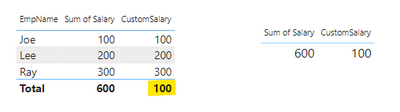
Instead of summing up all the Salary, it should sum up only where Department=HR as default.I created custom measure for this, default behaviour is working fine but when EmpName attribute and CustomSalary measure are used then Total value displays default value.
Please advice how to overcome this.
CustomSalary = IF(
HASONEFILTER(Employee[EmpName]) ,
SUM(Salary[Salary]),
CALCULATE(SUM(Salary[Salary]),Employee[Department] = "HR" )
)
Not entirely clear what you want...
Thanks for looking into this.
Total should display as value 600 (sum of all the Salary) instead of 100 (default Department=HR).
The Power BI Data Visualization World Championships is back! Get ahead of the game and start preparing now!
| User | Count |
|---|---|
| 19 | |
| 13 | |
| 10 | |
| 4 | |
| 4 |
| User | Count |
|---|---|
| 30 | |
| 28 | |
| 18 | |
| 11 | |
| 10 |