Join us at FabCon Atlanta from March 16 - 20, 2026, for the ultimate Fabric, Power BI, AI and SQL community-led event. Save $200 with code FABCOMM.
Register now!The Power BI Data Visualization World Championships is back! Get ahead of the game and start preparing now! Learn more
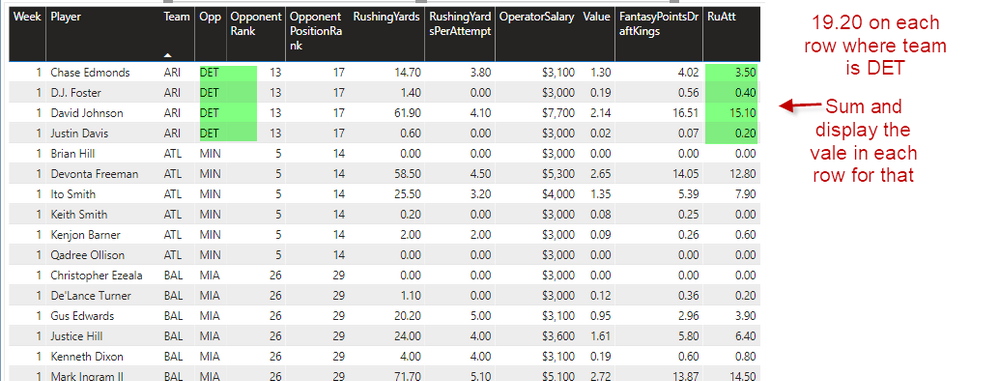
Looking for assitance in aggregating vales by team and populate that aggregated value for each row where team = that players team.
I have been trying to create measure as follows:
Solved! Go to Solution.
The earlier proposed solution was close.
The duplication probably happened if they faced the same team more than once in the season.
You need a calculated column:
TeamRuAtt = CALCULATE(SUM(RuAtt); ALLEXCEPT(Table, Team, Week))
Hi @dfsadvantage ,
Try something like:
CALCULATE(SUM(RuAtt); ALLEXCEPT(Table, Team, Opp))
Did I answer your question? Mark my post as a solution!
Ricardo
Didnt work for me, showed multiple rows of the same player...Here is a better description of what I am trying to do:
1)Calculate the Total RuAtt for each Team by summing the RuAtt for each player on that team.
2)Display the Total RuAtt for each player on the corresponding team/
// If the model is correct, then such a measure is easy:
[RuAtt for Team] =
CALCULATE(
[RuAtt], // this should be measure
VALUES( Teams[Team] ),
ALL( Teams )
)
// But if your model is incorrect... well,
// I can't help you, I'm afraid.
A correct model is one that follows the principles of dimensional design called "star-schema."
Best
D
The earlier proposed solution was close.
The duplication probably happened if they faced the same team more than once in the season.
You need a calculated column:
TeamRuAtt = CALCULATE(SUM(RuAtt); ALLEXCEPT(Table, Team, Week))
The Power BI Data Visualization World Championships is back! Get ahead of the game and start preparing now!
Check out the November 2025 Power BI update to learn about new features.
| User | Count |
|---|---|
| 20 | |
| 10 | |
| 9 | |
| 4 | |
| 4 |
| User | Count |
|---|---|
| 32 | |
| 31 | |
| 18 | |
| 12 | |
| 11 |