cancel
Showing results for 
Search instead for 
Did you mean: 

The Power BI Data Visualization World Championships is back! Get ahead of the game and start preparing now! Learn more

Reply
Imad-R
Frequent Visitor

Measure that depends on two other measures that themselves depend on filters

Hello,

Before talking about my problem here is the data :

IDName productQty (per unit)PriceTotalWeek
1Tomato52 €10 €W-1
2Apple61,50 €9 €W-1
3Fish33 €9 €W-1
4Chicken25 €10 €W-1
5Orange92 €18 €W-1
6Fish41,50 €6 €W-2
7Chicken15 €5 €W-2
8Apple71,50 €11 €W-2
9Carrot31 €3 €W-2
10Egg120,30 €4 €W-2


The following two tables will be useful for filtering :

Week F1
W-1
W-2


Week F2
W-1
W-2


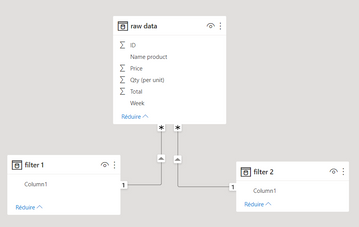
The relationship is as follows :

ImadR_0-1668553866297.png

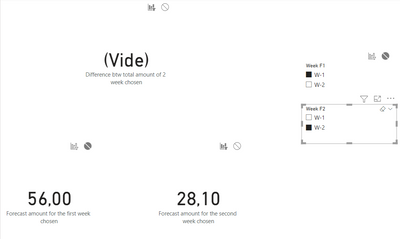
After that I create 3 measure. I made a sum on everything that was bought in the first chosen week and another sum for the second week, and the last measure is the difference between the two measure. My problem is that when I change the filter nothing changes on the third measurement

ImadR_1-1668555271180.png


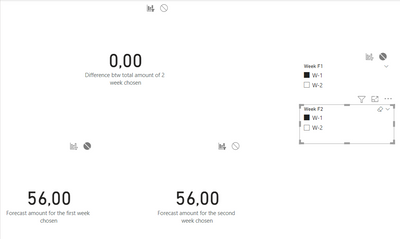
except when the filters are selected on the same values.

ImadR_2-1668555308587.png


I don't understand why this doesn't work and I have checked by managing the filter interactions but nothing works.


Please I need your help !!!

2 ACCEPTED SOLUTIONS
amitchandak
Super User
Super User

@Imad-R , One of the tables need to be independent


refer

How to use two Date/Period slicers

https://youtu.be/WSeZr_-MiTg


Compare Categorical Data Using Slicers - Compare two Brands: https://youtu.be/exN4nTewgbc

Share with Power BI Enthusiasts: Full Power BI Video (20 Hours) YouTube
Microsoft Fabric Series 60+ Videos YouTube
Microsoft Fabric Hindi End to End YouTube

View solution in original post

Anonymous
Not applicable

Hi @Imad-R ,


Relationships play an important role in power bi, and in many cases the correct configuration of relationships also affects the display of results. In your case, the existence of two week tables filtering the same table and establishing relationships can lead to conflicting filtering. Therefore, the relationship needs to be removed.
For documentation related to relationships see the following, which I hope will help you:

Relationship troubleshooting guidance - Power BI | Microsoft Learn

Model relationships in Power BI Desktop - Power BI | Microsoft Learn


Best regards,

Community Support Team Selina zhu

If this post helps, then please consider Accept it as the solution to help the other members find it more quickly

View solution in original post

3 REPLIES 3
amitchandak
Super User
Super User

@Imad-R , One of the tables need to be independent


refer

How to use two Date/Period slicers

https://youtu.be/WSeZr_-MiTg


Compare Categorical Data Using Slicers - Compare two Brands: https://youtu.be/exN4nTewgbc

Share with Power BI Enthusiasts: Full Power BI Video (20 Hours) YouTube
Microsoft Fabric Series 60+ Videos YouTube
Microsoft Fabric Hindi End to End YouTube

Hello and thank you for your response I've found the problem. I just deleted the relationships and know it's worked. But I don't understand exactly why I had to delete the relationships. Can you explain me, please?

Anonymous
Not applicable

Hi @Imad-R ,


Relationships play an important role in power bi, and in many cases the correct configuration of relationships also affects the display of results. In your case, the existence of two week tables filtering the same table and establishing relationships can lead to conflicting filtering. Therefore, the relationship needs to be removed.
For documentation related to relationships see the following, which I hope will help you:

Relationship troubleshooting guidance - Power BI | Microsoft Learn

Model relationships in Power BI Desktop - Power BI | Microsoft Learn


Best regards,

Community Support Team Selina zhu

If this post helps, then please consider Accept it as the solution to help the other members find it more quickly

Helpful resources

Announcements
November Power BI Update Carousel

Power BI Monthly Update - November 2025

Check out the November 2025 Power BI update to learn about new features.

Fabric Data Days Carousel

Fabric Data Days

Advance your Data & AI career with 50 days of live learning, contests, hands-on challenges, study groups & certifications and more!

FabCon Atlanta 2026 carousel

FabCon Atlanta 2026

Join us at FabCon Atlanta, March 16-20, for the ultimate Fabric, Power BI, AI and SQL community-led event. Save $200 with code FABCOMM.