Join us at FabCon Atlanta from March 16 - 20, 2026, for the ultimate Fabric, Power BI, AI and SQL community-led event. Save $200 with code FABCOMM.
Register now!The Power BI Data Visualization World Championships is back! Get ahead of the game and start preparing now! Learn more
Hello,
I have the following example data:
| Model | Submodel | Sold units | demand forecast | ABS(sold units-demand) |
| x | x1 | 3 | 2 | 1 |
| x | x2 | 4 | 7 | 3 |
| x | x3 | 15 | 4 | 11 |
| x | x4 | 6 | 4 | 2 |
I would like now to sum the different abs values (0+1+1+2) in model granularity, but instead, when applying to a Matrix, it calculates the abs as the following:
(3+4+15+6) - (2+7+4+4) = 28-17 =11
While I would like it to sum it like: (1+3+11+2) = 17
So the table would be:
| Model | Sold units | Demand Forecast | sum of Abs |
| x | 28 | 17 | 17 |
I have been trying everything and searching around. What is the proper way of doing this, and understanding it?
Thanks in advance
hi @Anonymous
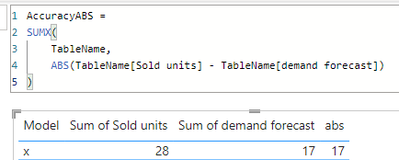
try to create a measure like this:
AccuracyABS =
SUMX(
TableName,
ABS(TableName[Sold units] - TableName[demand forecast])
)it worked like this:
Thanks for your answer.
The problem is Sold units and Demand Forecast are two different fact tables (Orders and Forecast), linked to a parent table called "Master" where there are categories to filter by (model, SKU, etc.).
@Anonymous First, please vote for this idea: https://ideas.powerbi.com/ideas/idea/?ideaid=082203f1-594f-4ba7-ac87-bb91096c742e
This looks like a measure totals problem. Very common. See my post about it here: https://community.powerbi.com/t5/DAX-Commands-and-Tips/Dealing-with-Measure-Totals/td-p/63376
Also, this Quick Measure, Measure Totals, The Final Word should get you what you need:
https://community.powerbi.com/t5/Quick-Measures-Gallery/Measure-Totals-The-Final-Word/m-p/547907
Also: https://youtu.be/uXRriTN0cfY
And: https://youtu.be/n4TYhF2ARe8
Also, see this: Matrix Measure Total Triple Threat Rock & Roll - Microsoft Power BI Community
Greg, tysm for your answer.
I have definately seen that different times but never started to learn about it. Thanks for the resources.
The Power BI Data Visualization World Championships is back! Get ahead of the game and start preparing now!
Check out the November 2025 Power BI update to learn about new features.
| User | Count |
|---|---|
| 20 | |
| 10 | |
| 9 | |
| 4 | |
| 4 |
| User | Count |
|---|---|
| 32 | |
| 31 | |
| 18 | |
| 12 | |
| 11 |