Hi I have an issue with Matrix subtotal. So i have one measure where i calculate each line's value and a 2nd measure where i used a crossfilter to put a value to all lines. Then i created a third measure to merge both first and second measures in one column. See below:
Measure 1: BS02AsAtAllTransactionAmountDKK = CALCULATE(sum(GLTransClient[Amount]),DATESBETWEEN('Calendar'[Date],[BSFirstDate],[BSDateSelected]))
Measure 2: BS03NetProfit = CALCULATE(CALCULATE(sum(GLTransClient[Amount]),all(BSGLCoAHeaders[Count.Level0]),all('Calendar'[Date]),DATESBETWEEN('Calendar'[Date],[BSFirstDate],[BSDateSelected]),value(GLTransClient[Account])<5000000),CROSSFILTER(GLAccountClient[Account],GLChartOfAccounts[Account],None))
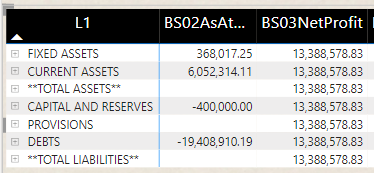
Measure 3: BS04AsAtAllTransactionAmountDKKwithResultsYTD =
VAR result = [BS02AsAtAllTransactionAmountDKK]
RETURN
IF(SELECTEDVALUE(GLChartOfAccounts[L2]) = "Results year to date", value([BS03NetProfit]), result)

Up to now, all is working fine but when i collapse the CAPITAL AND RESERVES, the Results year to date is not being added to the subtotal.

All the other subtotals in the same column are working fine.
Grateful for any kind assistance.


