cancel
Showing results for 
Search instead for 
Did you mean: 

The Power BI Data Visualization World Championships is back! Get ahead of the game and start preparing now! Learn more

Reply
Anonymous
Not applicable

Matrix by quarters


Hey guys,


I have the following data table:

StreamStart DateSalary
DevJan 1, 2022100,000
SalesMar 3, 2022120,000
SalesJuly 1, 2022100,000
PMOct 10, 2022140,000


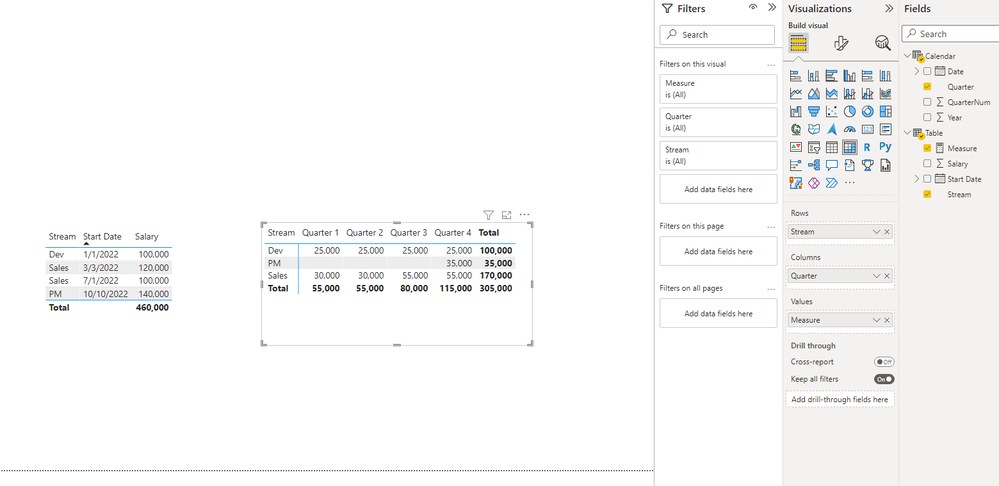
I am trying to display a matrix like this, where I can estimate the cost of each resource by quarter based on their salary (i.e Salary/12 x 3 for each quarter depending on the month in the quarter they sarted):

StreamQuarter 1Quarter 2Quarter3Quarter 4
Dev    
Sales    
PM    


The Start Date represent the starting date of the resource with their annual salary.

I need a function to determine the quarterly salary of that resource broken down into 4 quarter, starting from quarter his start date falls into.

Then using that function in a Matrix visual display the above table.


For example, if a resource started in June 2022 with a salary of 100K The table would display

Stream Q1  Q2    Q3    Q4

Dev      0$   25K  25K  25K


if he started in july then Q2 would reflect that month.


Your help is appreicated.


Thank you

1 ACCEPTED SOLUTION
Icey
Community Support
Community Support

Hi @Anonymous ,


How about this:

Calendar = 
ADDCOLUMNS (
    CALENDARAUTO (),
    "Year", YEAR ( [Date] ),
    "QuarterNum", QUARTER ( [Date] ),
    "Quarter", "Quarter " & QUARTER ( [Date] )
)


Measure = 
VAR t =
    SUMMARIZE (
        FILTER (
            CROSSJOIN ( 'Calendar', 'Table' ),
            'Calendar'[Date] >= 'Table'[Start Date]
        ),
        [Stream],
        [Year],
        [Quarter],
        [Salary]
    )
RETURN
    SUMX ( t, [Salary] / 4 )


Icey_0-1653287850486.png


Best Regards,

Icey


If this post helps, then please consider Accept it as the solution to help the other members find it more quickly.

View solution in original post

3 REPLIES 3
Greg_Deckler
Community Champion
Community Champion

@Anonymous You can use Quarter in a calculated column: Quarter - Microsoft Power BI Community


Follow on LinkedIn
@ me in replies or I'll lose your thread!!!
Instead of a Kudo, please vote for this idea
Become an expert!: Enterprise DNA
External Tools: MSHGQM
YouTube Channel!: Microsoft Hates Greg
Latest book!:
DAX For Humans

DAX is easy, CALCULATE makes DAX hard...
Anonymous
Not applicable

THanks Greg. Sorry I should have been more clearer.

The Start Date represent the starting date of the resource with their annual salary.

I need a function to determine the quarterly salary of that resource broken down into 4 quarter, starting from quarter his start date falls into.

Then using that function in a Matrix visual display the above table.


For example, if a resource started in June 2022 with a salary of 100K The table would display

Stream Q1  Q2    Q3    Q4

Dev      0$   25K  25K  25K


if he started in july then Q2 would reflect that month.

thanks again

Icey
Community Support
Community Support

Hi @Anonymous ,


How about this:

Calendar = 
ADDCOLUMNS (
    CALENDARAUTO (),
    "Year", YEAR ( [Date] ),
    "QuarterNum", QUARTER ( [Date] ),
    "Quarter", "Quarter " & QUARTER ( [Date] )
)


Measure = 
VAR t =
    SUMMARIZE (
        FILTER (
            CROSSJOIN ( 'Calendar', 'Table' ),
            'Calendar'[Date] >= 'Table'[Start Date]
        ),
        [Stream],
        [Year],
        [Quarter],
        [Salary]
    )
RETURN
    SUMX ( t, [Salary] / 4 )


Icey_0-1653287850486.png


Best Regards,

Icey


If this post helps, then please consider Accept it as the solution to help the other members find it more quickly.

Helpful resources

Announcements
Power BI DataViz World Championships

Power BI Dataviz World Championships

The Power BI Data Visualization World Championships is back! Get ahead of the game and start preparing now!

December 2025 Power BI Update Carousel

Power BI Monthly Update - December 2025

Check out the December 2025 Power BI Holiday Recap!

FabCon Atlanta 2026 carousel

FabCon Atlanta 2026

Join us at FabCon Atlanta, March 16-20, for the ultimate Fabric, Power BI, AI and SQL community-led event. Save $200 with code FABCOMM.