Join us at FabCon Atlanta from March 16 - 20, 2026, for the ultimate Fabric, Power BI, AI and SQL community-led event. Save $200 with code FABCOMM.
Register now!The Power BI Data Visualization World Championships is back! Get ahead of the game and start preparing now! Learn more
I'd like to multiply quantity of units produced or forecasted for a particular month by the appropriate standard hours - the result measure will be called 'Earned Hours'.
Normally a sumx and related formula should work, but the thing is that we have to apply current standard hours to future months in the formula.
Table 1: Production_Forecast
| Scenario | Period | Model | Quantity Produced or Planned |
| Actual | 201901 | A | 5 |
| Actual | 201901 | B | 6 |
| … | … | … | … |
| Actual | 201911 | A | 3 |
| Actual | 201911 | B | 4 |
| Actual | 201912 | A | 7 |
| Actual | 201912 | B | 8 |
| Forecast | 202001 | A | 5 |
| Forecast | 202001 | B | 4 |
| … | … | … | … |
Table 2: Standard Hours
| Period | Model | Department | Standard Hours |
| 201901 | A | Backshop | 5 |
| 201901 | A | Final Assembly | 2 |
| 201901 | B | Backshop | 6 |
| 201901 | B | Final Assembly | 1 |
| … | … | … | |
| 201912 | A | Backshop | 7 |
| 201912 | A | Final Assembly | 2.5 |
| 201912 | B | Backshop | 8 |
| 201912 | B | Final Assembly | 3 |
So what is the result you are looking for?
The measure should add results from two calculations:
1) For months tagged as "Actual" - multiply quantity produced by the related hours for particular month (Excel sumproduct formula): quantity from Jan 2019 times standard hours from Jan 2019, quantity from Feb 2019 times standard hours from Feb 2019
2) For months tagged as "Forecast" - multiply quantities from all months by the last available standard hours (Dec 2019 standard hours in the example shown)
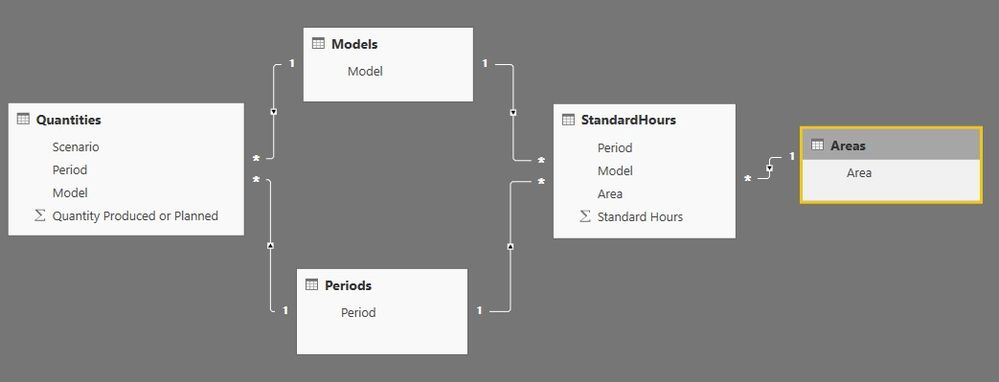
Here is the model:
and PBIX file: Earned Hours.pbix
The Power BI Data Visualization World Championships is back! Get ahead of the game and start preparing now!
Check out the November 2025 Power BI update to learn about new features.
| User | Count |
|---|---|
| 20 | |
| 10 | |
| 9 | |
| 4 | |
| 4 |
| User | Count |
|---|---|
| 33 | |
| 31 | |
| 19 | |
| 12 | |
| 11 |