Don't miss your chance to take the Fabric Data Engineer (DP-600) exam for FREE! Find out how by attending the DP-600 session on April 23rd (pacific time), live or on-demand.
Learn moreNext up in the FabCon + SQLCon recap series: The roadmap for Microsoft SQL and Maximizing Developer experiences in Fabric. All sessions are available on-demand after the live show. Register now
Hi
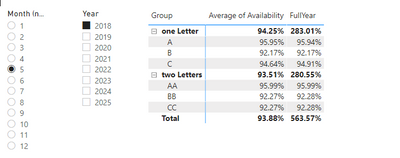
I need to compute a weighted average and while each row of the matrix is following the DAX i created, the subtotal for each group is doing some sort of sum. Not only do i not understand what sum it is doing but what i want is the Average of each entry in the group.
The general idea is to get the full year of the budgetted availability weighted by the number of days in each month. This value should be the same regardless of the month picked in slicers, it isn't a YTD sort of year. The DAX is the following:
FullYear =
var MultSum = CALCULATE(SUMX('Sheet1', ([Availability])*[Days of the month]), ALL('Calendar Table'), VALUES('Calendar Table'[Year]))
var SumDays = CALCULATE(COUNTROWS('Calendar Table'), ALL('Calendar Table'), VALUES('Calendar Table'[Year]))
return MultSum / SumDays
I recreated my issue in a simple example. I would post the files but i can figure out how to import them here. Essentially, for the "one Letter" group, the "FullYear" value should have been 95.94%.
Report & Data examples:
[Snapshots]
Solved! Go to Solution.
@DFC This looks like a measure totals problem. Very common. See my post about it here: https://community.powerbi.com/t5/DAX-Commands-and-Tips/Dealing-with-Measure-Totals/td-p/63376
Also, this Quick Measure, Measure Totals, The Final Word should get you what you need:
https://community.powerbi.com/t5/Quick-Measures-Gallery/Measure-Totals-The-Final-Word/m-p/547907
Also, you may find this helpful as well:
Matrix Measure Total Triple Threat Rock & Roll - Microsoft Power BI Community
@DFC This looks like a measure totals problem. Very common. See my post about it here: https://community.powerbi.com/t5/DAX-Commands-and-Tips/Dealing-with-Measure-Totals/td-p/63376
Also, this Quick Measure, Measure Totals, The Final Word should get you what you need:
https://community.powerbi.com/t5/Quick-Measures-Gallery/Measure-Totals-The-Final-Word/m-p/547907
Also, you may find this helpful as well:
Matrix Measure Total Triple Threat Rock & Roll - Microsoft Power BI Community
I followed your suggestion, @Greg_Deckler, of the IF( HASONEFILTER(...)) and it worked. However, I feel like i just "hammered" the right answer onto the report when there's probably a better DAX to be used. Could you correct my DAX especially for the case where HASONEFILTER is false.
FullYear_subtot =
var MultSum = CALCULATE(SUMX('Sheet1', ([Availability])*[Days of the month]), ALL('Calendar Table'), VALUES('Calendar Table'[Year]))
var SumDays = CALCULATE(COUNTROWS('Calendar Table'), ALL('Calendar Table'), VALUES('Calendar Table'[Year]))
return IF(
HASONEFILTER(Sheet1[Type]),
MultSum / SumDays,
CALCULATE(SUMX('Sheet1', ([Availability])*[Days of the month]), ALL('Sheet1'), VALUES('Sheet1'[Group]), VALUES('Calendar Table'[Year])) / (SumDays * CALCULATE(DISTINCTCOUNT(Sheet1[Type]), VALUES(Sheet1[Group])))
)
I would accept your answer as the correct one immediately but im not sure if that wont shut down the whole thread and Id like to have some feedback from you.
Thank you for pointing me tot he right direction.
If you have recently started exploring Fabric, we'd love to hear how it's going. Your feedback can help with product improvements.
A new Power BI DataViz World Championship is coming this June! Don't miss out on submitting your entry.
Share feedback directly with Fabric product managers, participate in targeted research studies and influence the Fabric roadmap.
| User | Count |
|---|---|
| 9 | |
| 6 | |
| 3 | |
| 2 | |
| 2 |
| User | Count |
|---|---|
| 21 | |
| 14 | |
| 9 | |
| 5 | |
| 5 |