FabCon is coming to Atlanta
Join us at FabCon Atlanta from March 16 - 20, 2026, for the ultimate Fabric, Power BI, AI and SQL community-led event. Save $200 with code FABCOMM.
Register now!- Power BI forums
- Get Help with Power BI
- Desktop
- Service
- Report Server
- Power Query
- Mobile Apps
- Developer
- DAX Commands and Tips
- Custom Visuals Development Discussion
- Health and Life Sciences
- Power BI Spanish forums
- Translated Spanish Desktop
- Training and Consulting
- Instructor Led Training
- Dashboard in a Day for Women, by Women
- Galleries
- Data Stories Gallery
- Themes Gallery
- Contests Gallery
- QuickViz Gallery
- Quick Measures Gallery
- Visual Calculations Gallery
- Notebook Gallery
- Translytical Task Flow Gallery
- TMDL Gallery
- R Script Showcase
- Webinars and Video Gallery
- Ideas
- Custom Visuals Ideas (read-only)
- Issues
- Issues
- Events
- Upcoming Events
The Power BI Data Visualization World Championships is back! Get ahead of the game and start preparing now! Learn more
- Power BI forums
- Forums
- Get Help with Power BI
- DAX Commands and Tips
- Re: Lost Product
- Subscribe to RSS Feed
- Mark Topic as New
- Mark Topic as Read
- Float this Topic for Current User
- Bookmark
- Subscribe
- Printer Friendly Page


- Mark as New
- Bookmark
- Subscribe
- Mute
- Subscribe to RSS Feed
- Permalink
- Report Inappropriate Content
Lost Product
Hi All,
I am trying to identify lost product within my sample file for over 3 months ago. So All products thats meet the below criteria and over than 3 months old (rolling).
Criteria as follows: 1. product (col)= Production 2. Action (col) = View 3. Period is rolling last 3 months
Here is my DAX attempt:
Lost Product =
VAR _Period = DATESINPERIOD(Data[Date],MAX(Data[Date]),-3,MONTH)
Return
CALCULATE(DISTINCTCOUNT(Data[Product]),NOT(Data[Date]) in _Period,FILTER(Data, Data[Product] ="Production"),FILTER(Data,Data[Action] = "View"))
The above dax return 1 record only, where I was expecting 4 records.
Any advice or tips would be much appreciated.
Solved! Go to Solution.


- Mark as New
- Bookmark
- Subscribe
- Mute
- Subscribe to RSS Feed
- Permalink
- Report Inappropriate Content
Hi @H_insight ,
In my sample, Lost Product is a calculated column, I also create a measure in my sample, it cannot get the expected result, I attach it bellow to help you understand.
Best Regards,
Community Support Team _ kalyj
If this post helps, then please consider Accept it as the solution to help the other members find it more quickly.
- Mark as New
- Bookmark
- Subscribe
- Mute
- Subscribe to RSS Feed
- Permalink
- Report Inappropriate Content
Hi @H_insight ,
According to your description, here’s my solution. “Lost Product” is a column. as in the visual, the same options are not displayed repeatedly, so they add up to 3.
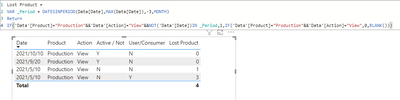
Best Regards,
Community Support Team _ kalyj
If this post helps, then please consider Accept it as the solution to help the other members find it more quickly.
- Mark as New
- Bookmark
- Subscribe
- Mute
- Subscribe to RSS Feed
- Permalink
- Report Inappropriate Content
How can you refrence columns in the IF functions as it shows as error? unless you want me to creat a calculated column?

Lost Product 3 =
VAR _Period =
    DATESINPERIOD ( Data[Date], MAX ( Data[Date] ), -3, MONTH )
RETURN
IF( 'Data'[Product] = "Production" && Data[Action] = "View" && NOT('Data'[Date]) IN _Period,1,
    IF( 'Data'[Product] = "Production" && Data[Action] = "View",0,BLANK()))
- Mark as New
- Bookmark
- Subscribe
- Mute
- Subscribe to RSS Feed
- Permalink
- Report Inappropriate Content
Hi @H_insight ,
In my sample, Lost Product is a calculated column, I also create a measure in my sample, it cannot get the expected result, I attach it bellow to help you understand.
Best Regards,
Community Support Team _ kalyj
If this post helps, then please consider Accept it as the solution to help the other members find it more quickly.
- Mark as New
- Bookmark
- Subscribe
- Mute
- Subscribe to RSS Feed
- Permalink
- Report Inappropriate Content
Hi @v-yanjiang-msft ,
Thanks again for your attempt, much appreciated. I realised the measure won't get me the expected result. For now I will accept this as a soultion.
Thanks, H


- Mark as New
- Bookmark
- Subscribe
- Mute
- Subscribe to RSS Feed
- Permalink
- Report Inappropriate Content
@H_insight Did you need this?
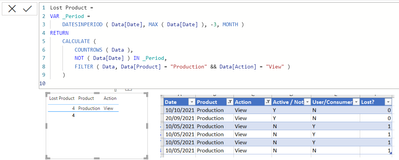
Lost Product =
VAR _Period =
    DATESINPERIOD ( Data[Date], MAX ( Data[Date] ), -3, MONTH )
RETURN
    CALCULATE (
        COUNTROWS ( Data ),
        NOT ( Data[Date] ) IN _Period,
        FILTER ( Data, Data[Product] = "Production" && Data[Action] = "View" )
    )
- Mark as New
- Bookmark
- Subscribe
- Mute
- Subscribe to RSS Feed
- Permalink
- Report Inappropriate Content
- Mark as New
- Bookmark
- Subscribe
- Mute
- Subscribe to RSS Feed
- Permalink
- Report Inappropriate Content
@H_insight can you please provide your desired output clearly?
- Mark as New
- Bookmark
- Subscribe
- Mute
- Subscribe to RSS Feed
- Permalink
- Report Inappropriate Content
Expected outcome like this:
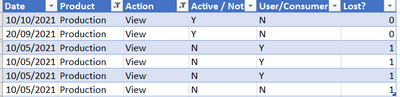
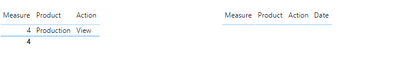
with the new measure the output shows the correct result (4 records) but when I add "Date" column, nothing shows in PBI.

Helpful resources

Power BI Dataviz World Championships
The Power BI Data Visualization World Championships is back! Get ahead of the game and start preparing now!

Power BI Monthly Update - December 2025
Check out the December 2025 Power BI Holiday Recap!

FabCon Atlanta 2026
Join us at FabCon Atlanta, March 16-20, for the ultimate Fabric, Power BI, AI and SQL community-led event. Save $200 with code FABCOMM.

| User | Count |
|---|---|
| 14 | |
| 5 | |
| 5 | |
| 3 | |
| 3 |


| User | Count |
|---|---|
| 24 | |
| 10 | |
| 10 | |
| 6 | |
| 6 |


