cancel
Showing results for 
Search instead for 
Did you mean: 

The Power BI Data Visualization World Championships is back! Get ahead of the game and start preparing now! Learn more

Reply
Coxy_CMV
Helper I
Helper I

Lose granularity with DAX filter applied when adding filter

Please could I ask for help. I think that I have a simple error in my formula but can not see what it is. I hope that I have not missed a previous post - I maybe describing it incorrectly.


Still very green but here we go:


I am using Power Pivot and with the following formula I get the desired results as shown below but have to filter the latest date out as they are not required in the pivot table. I have filtered out the date 06/07/20. Next week I need to filter out 14/07/20 and so on.  I have Date in Axis and Dax in values.

All Campaigns:=COUNTROWS(VACampaigns)
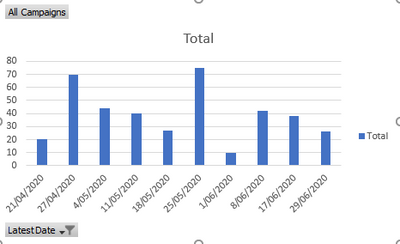
Date.png 


I then want to go one step further and remove the latest date with the DAX so I do not have to change the filter every time. This is the formula that I wrote:

Filtered Campaigns:=COUNTROWS(FILTER(VACampaigns,VACampaigns[Latest Date] <> max(VACampaigns[Latest Date])))

But the pivot table changes and I end up with a grand total and the granularity of the date has gone.  I do not know why this is happening or what I am overlooking:
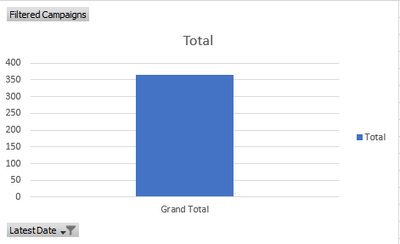
NoDate.png


What I have noticed is the following DAX presents a pivot table the way I expect:

CountByDate:=CALCULATE(COUNTROWS(VACampaigns),FILTER(VACampaigns,VACampaigns[Latest Date] =MAX(VACampaigns[Latest Date])))

but the moment I change the =MAX to <>MAX I go back to the single grand total coloumn. 


What am I doing wrong/what is happening, my skill level is pretty basic.


Thank you for you time and help.


Coxy

1 ACCEPTED SOLUTION
AntrikshSharma
Super User
Super User

Because when you are at 21/04 that is the MAX date when you are at 27/04 that is the max date the MAX function is evaluated in the filter context outside of you measure you can create a new calculated column to check if dates are less than a specific date and that column will return TRUE/FALSE and then use it inside CALCULATE

CALCULATE(
    [Total Sales],
    FILTER(
        ALL( Dates ),
        Dates[Date] <= MAX( Dates[Date] )
    ),
    Dates[DatesLessThanMyDate] = TRUE()
)

View solution in original post

2 REPLIES 2
AntrikshSharma
Super User
Super User

Because when you are at 21/04 that is the MAX date when you are at 27/04 that is the max date the MAX function is evaluated in the filter context outside of you measure you can create a new calculated column to check if dates are less than a specific date and that column will return TRUE/FALSE and then use it inside CALCULATE

CALCULATE(
    [Total Sales],
    FILTER(
        ALL( Dates ),
        Dates[Date] <= MAX( Dates[Date] )
    ),
    Dates[DatesLessThanMyDate] = TRUE()
)

Thank you @AntrikshSharma . Although I do not fully understand the formula, creating the calculated column to yeild a true/false column and using that does the job. I will study your solution further so I can fully appreciate your responce. Thank you.

Helpful resources

Announcements
Power BI DataViz World Championships

Power BI Dataviz World Championships

The Power BI Data Visualization World Championships is back! Get ahead of the game and start preparing now!

December 2025 Power BI Update Carousel

Power BI Monthly Update - December 2025

Check out the December 2025 Power BI Holiday Recap!

FabCon Atlanta 2026 carousel

FabCon Atlanta 2026

Join us at FabCon Atlanta, March 16-20, for the ultimate Fabric, Power BI, AI and SQL community-led event. Save $200 with code FABCOMM.