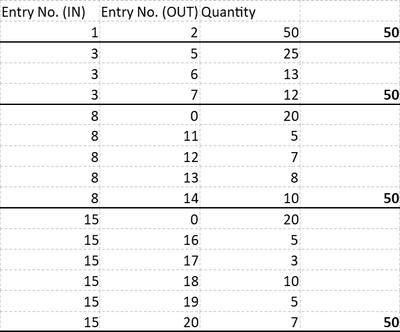
I'm in need of a solution, which I'm sure is possible, but beyond my current PowerBI skill-set.
Thanks in advance for your help.
I have a table with 4 columns:
- [Row ID] - a generic row# of the table
- [Entry No.] - link to an entry in an inventory table
- [Entry No. (IN)] - if the [Entry No.] was an inbound entry (an increase to inventory) then identifies the same as [Entry No.]
- [Entry No. (OUT)] - if the entry was an outbound entry (an decrese to inventory) then identifies the same as [Entry No.]
The purpose of the table is to trace the moment of inventory transactions through the system - from the initial inbound/increase entry through to whe the inventory left/decreased.
Below are some examples of increasing complexity:
Example 1
- [Entry No.] 1 is an increase in inventory of 50
- [Entry No.] 2 is a decrease in inventory of 50 linked to [Entry No.] 1

Required result I need is

Example 2 - slightly more complex
- same as example 1, but this time two entries [Entry No.] 2 and 3 have 25 each consuming the original 50

Required result I need is

Example 3 - slightly more complex again
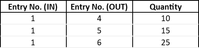
- same as example 1 and 2 except this time [Entry No.] 2, of which 25 came from [Entry No.] 1 gets consumed again into [Entry No.] 4 and 5 at a quantity of 10 and 15 respectively.
- [Entry No.] 3 also goes on to be consumed into [Entry No.] 6

Required result I need is
Example 4 - another slightly more complex scenario
- 25 of [Entry No.] 1 goes into [Entry No.] 2 which in-tun goes into [Entry No.] 3 which in-turn goes into [Entry No.] 4 which finally gets split into [Entry No.] 5 and 6.
- Note 25 of [Entry No.] 1 is still yet to be used, so this needs to show also.
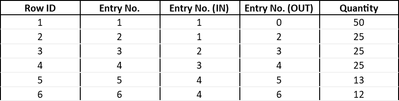
Required result I need is
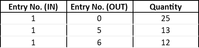
Hopefully from these examples below you can see the table I'm trying to build could be described as: "for each inbound entry (defined as where [Entry No. (IN)] not blank AND [Entry No. (OUT)] = 0) I need to know where and in what quantity it has ended up."
Where it ended up will always be the MAX([Entry No. (OUT)]). However it's not a rule that the [Entry No. (IN)] is always less than the [Entry No. (OUT)], sometimes (IN) will be higher than (OUT), however the MAX([Entry No. (OUT)] will always be the "where it went" for the higher (IN). example:

Required result I need is
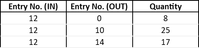
You'll see fomr the examples also that any quantities yet to be fully used/consumed should also be visible.
below is a larger set of example data and expected results.
| Row ID | Entry No. | Entry No. (IN) | Entry No. (OUT) | Quantity |
| 1 | 1 | 1 | 0 | 50 |
| 2 | 2 | 1 | 2 | 50 |
| 3 | 3 | 3 | 0 | 50 |
| 4 | 4 | 3 | 4 | 25 |
| 5 | 5 | 3 | 5 | 25 |
| 6 | 6 | 4 | 6 | 13 |
| 7 | 7 | 4 | 7 | 12 |
| 8 | 8 | 8 | 0 | 50 |
| 9 | 9 | 8 | 9 | 30 |
| 10 | 10 | 9 | 10 | 15 |
| 11 | 11 | 9 | 11 | 15 |
| 12 | 12 | 10 | 12 | 7 |
| 13 | 13 | 10 | 13 | 8 |
| 14 | 14 | 11 | 14 | 10 |
| 15 | 15 | 15 | 0 | 50 |
| 16 | 16 | 15 | 16 | 10 |
| 17 | 17 | 15 | 17 | 10 |
| 18 | 18 | 15 | 18 | 10 |
| 19 | 19 | 16 | 19 | 5 |
| 20 | 20 | 17 | 20 | 7 |