
cancel
Showing results for 
Search instead for 
Did you mean: 

The Power BI Data Visualization World Championships is back! Get ahead of the game and start preparing now! Learn more

Reply
George1973
Helper V
Helper V

Lookupvalue referenced to the its own column

Good evening,

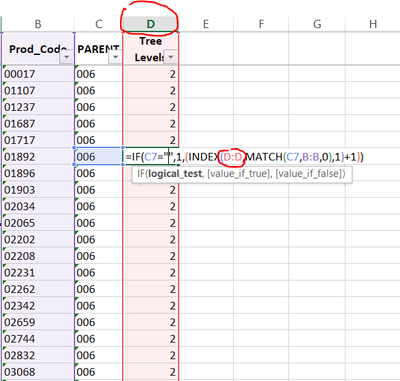
I have excel "Index-Match" formulas which referes (for the result column) its own column, like given in the picture below:


George1973_0-1658948294712.png

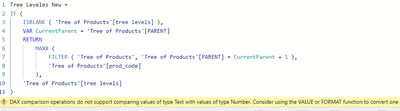
I want to implement this approach in Power Bi calculated column to, but it does not work - I can not refer to the same column where I want to write a mesure..

George1973_1-1658948732535.png

Simply to say - There is no reference at all for any formula to the same calculating column..

Please help. In excel it's very easy.. but here I've got a "ubreakable wall" 😞


5 REPLIES 5
tamerj1
Super User
Super User

Hi @George1973 
To be honest, I'm trying to guess your expected result. Please try

Tree Leveles New =
IF (
    ISBLANK ( 'Tree of Products'[tree levels] ),
    VAR CurrentParent = 'Tree of Products'[PARENT]
    RETURN
        MAXX (
            FILTER ( 'Tree of Products', 'Tree of Products'[PARENT] = CurrentParent + 1 ),
            'Tree of Products'[product_code]
        ),
    'Tree of Products'[tree levels]
)

Hi @tamerj1 

I've tried. Did not work.

George1973_0-1658977803566.png

Unfortunately I can not attached excel sample spreadsheet for better underttandung the outcome.

Hi Again @tamerj1 
I will try to show you the outcomes in steps through screenshots:
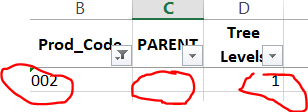
Step 1: Defining the first product group level:

George1973_0-1658979935594.png


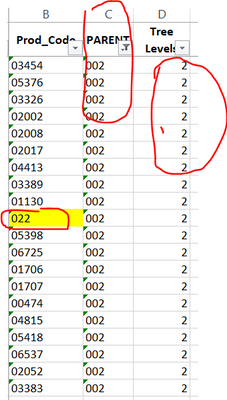
Step 2: Define the second group level

When the Prod_code is now in parent:

George1973_1-1658980111145.png


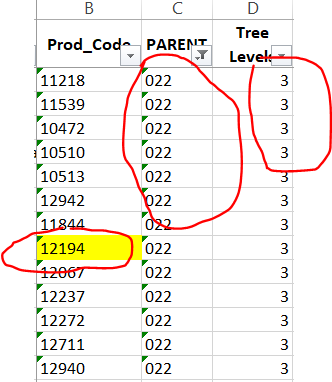
Step 3: Define the 3rd level, now the prod_code 022 is in parent:

George1973_2-1658980277030.png

End so on 🙂


Hi @George1973 
Sorry for the late reply. You can upload the excel to WeTransfer or DropBox and share the link here. I have a feeling that this is one of the recursive calculations that can be solved by dax.

Hi @tamerj1 ,


I'm  happy to have you follow up - Beleive me, it is very urgent issue for me and I would be more than gratefull for finding solution for it.

Here is the drop-box link of the excel data:


https://www.dropbox.com/s/yki0kr6peghfo7d/product_tree.xlsx?dl=0


Helpful resources

Announcements
Power BI DataViz World Championships

Power BI Dataviz World Championships

The Power BI Data Visualization World Championships is back! Get ahead of the game and start preparing now!

November Power BI Update Carousel

Power BI Monthly Update - November 2025

Check out the November 2025 Power BI update to learn about new features.

FabCon Atlanta 2026 carousel

FabCon Atlanta 2026

Join us at FabCon Atlanta, March 16-20, for the ultimate Fabric, Power BI, AI and SQL community-led event. Save $200 with code FABCOMM.