Join us at FabCon Atlanta from March 16 - 20, 2026, for the ultimate Fabric, Power BI, AI and SQL community-led event. Save $200 with code FABCOMM.
Register now!The Power BI Data Visualization World Championships is back! Get ahead of the game and start preparing now! Learn more
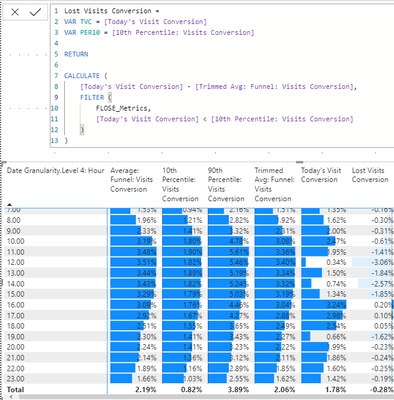
Greetings. Below I have an example of a DAX formula where the FILTER isn't behaving as I expect. I want it to only calculate the rows (hours) where today's conversion is lower than the 10th percentile of the same data. It just calculates it as if the FILTER statement isn't there for every row.
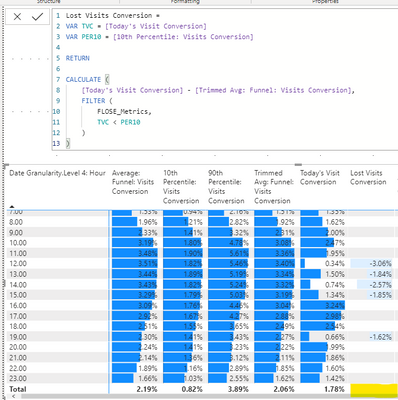
However, if I use the VARs I created at the top as the basis for the filter, it works. I don't know enough about FILTER to understand why, but I'm guessing that using VARs is comparing the values in the table, whilst FILTER is iterating through a copy of the data in the data source and doing its own magic, producing undesired results.
This is great, but I don't get my total now, because the total number isn't lower than the 10th percentile. I need that total, as I want to calculate an overall number as the basis for another DAX formula's total.
Any ideas on how to solve this? I truly have no idea.
Solved! Go to Solution.
Have you tried using "hasonevalue" function?
Using this function you can create separate calculation for total vs detail row.
Example:
IF (
HASONEVALUE ( Table[Granularity] ),
SUM ( Table[Calculation1] ),
AVERAGE (Table[Calculation2] )
)
There are two things at play here (actually three)
1. Variables help you preserve data across context transitions. This means they have no effect in your first example, but do have an effect in your second example where you use CALCULATE.
2. When you write measures you will want to write them from the perspective of the totals collection. Oftentimes that also works for the individual "rows". The reverse is seldom true (writing a measure for the individual cell rarely works for the totals)
3. You reference other measures in your measure. We have no idea what's happening in those measures. General advice is to avoid nested measures both for performance and also to avoid surprises caused by the way those measures are designed and may be interfering with your calculations.
Please show the definitions for the other measures, provide usable sample data, and show the expected outcome.
There are two things at play here (actually three)
1. Variables help you preserve data across context transitions. This means they have no effect in your first example, but do have an effect in your second example where you use CALCULATE.
2. When you write measures you will want to write them from the perspective of the totals collection. Oftentimes that also works for the individual "rows". The reverse is seldom true (writing a measure for the individual cell rarely works for the totals)
3. You reference other measures in your measure. We have no idea what's happening in those measures. General advice is to avoid nested measures both for performance and also to avoid surprises caused by the way those measures are designed and may be interfering with your calculations.
Please show the definitions for the other measures, provide usable sample data, and show the expected outcome.
@lbendlin you second point made a lot of sense. I am going to change the logic of the filter and the overall calculation with this in mind and see if I can solve it. If I remain stuck I'll come back and post more details as requested.
Have you tried using "hasonevalue" function?
Using this function you can create separate calculation for total vs detail row.
Example:
IF (
HASONEVALUE ( Table[Granularity] ),
SUM ( Table[Calculation1] ),
AVERAGE (Table[Calculation2] )
)
The Power BI Data Visualization World Championships is back! Get ahead of the game and start preparing now!
Check out the November 2025 Power BI update to learn about new features.
| User | Count |
|---|---|
| 20 | |
| 10 | |
| 9 | |
| 4 | |
| 4 |
| User | Count |
|---|---|
| 34 | |
| 31 | |
| 20 | |
| 12 | |
| 11 |