Join us at FabCon Atlanta from March 16 - 20, 2026, for the ultimate Fabric, Power BI, AI and SQL community-led event. Save $200 with code FABCOMM.
Register now!The Power BI Data Visualization World Championships is back! Get ahead of the game and start preparing now! Learn more
Hi Everyone,
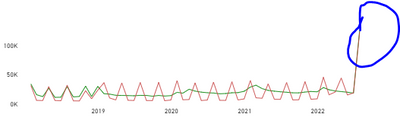
I have this line chart. This is the view when I selected June,30,2022 on my date slicer. It shows me results for July 31 2022 and adds up all the data points thus giving me a spike. Unsure as to what mught be causing this. if I have the latest date selected, For example July 12, it gives me correct chart. but if I have a previous date selected it shows me data beyond that date, which is not expected.
The measures used are structured as below
Solved! Go to Solution.
@_Regina , Try if this can work
var _start_date = CALCULATE(MIN('_date unpivot'[Date Key]))
var _end_date = CALCULATE(MAX('_date unpivot'[Date Key]))
var r = CALCULATE(
DISTINCTCOUNT('client'[Client ID]),
filter('transaction', 'transaction'[Processing Date]>= _start_date && 'transaction'[Processing Date] <= _end_date),
'transaction'[Transaction Category] = "Gross Sales"
)
@_Regina , Try if this can work
var _start_date = CALCULATE(MIN('_date unpivot'[Date Key]))
var _end_date = CALCULATE(MAX('_date unpivot'[Date Key]))
var r = CALCULATE(
DISTINCTCOUNT('client'[Client ID]),
filter('transaction', 'transaction'[Processing Date]>= _start_date && 'transaction'[Processing Date] <= _end_date),
'transaction'[Transaction Category] = "Gross Sales"
)
Thank you once again, but why would your solution work and not mine ?
Check out the November 2025 Power BI update to learn about new features.
Advance your Data & AI career with 50 days of live learning, contests, hands-on challenges, study groups & certifications and more!
| User | Count |
|---|---|
| 20 | |
| 11 | |
| 9 | |
| 4 | |
| 4 |
| User | Count |
|---|---|
| 31 | |
| 29 | |
| 21 | |
| 12 | |
| 12 |