cancel
Showing results for 
Search instead for 
Did you mean: 

Get Fabric Certified for FREE during Fabric Data Days. Don't miss your chance! Request now

Reply
jfpalumbo123
Frequent Visitor

Last Sale Date and Amount per Product with Total

Data sample is:


Product    Date          Amount

1               01/02       $100

1               02/15       $200

2               02/15       $300

2               03/31       $400


I am trying to get:

1 - Last Date and Amount per Product

2 - Total Amount of all items in #1


Desired output is:

Product    Date          Amount

1               02/15       $200

2               03/31       $400

                   Total:      $600


I can get #1 via many methods, but my Total row is always only showing the Amount of the last Date over all the data (or other issues) but not the desired output. ie: Total row only shows 03/31 value of $400, but I cannot get it to include the Product 1 02/15 Amount of $200 so that my total is $600 as desired.


1 ACCEPTED SOLUTION
ValtteriN
Super User
Super User

Hi,

Here is one way to do this with a filter measure:

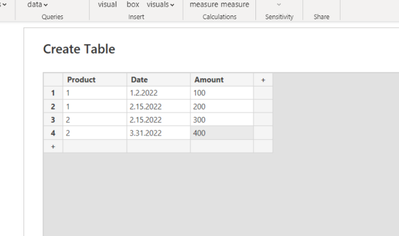
data:

ValtteriN_0-1671315064135.png

dax:

Filter last date for product =
var _ldate = CALCULATE(MAX('Table (15)'[Date]),ALL('Table (15)'[Date])) return
IF(MAX('Table (15)'[Date])=_ldate,1,0)


Now place the measure to your visual:
ValtteriN_1-1671315196388.png

Measure 25 is just a sum measure for getting the total. For total amount of items you can use count.

I hope this post helps to solve your issue and if it does consider accepting it as a solution and giving the post a thumbs up!

My LinkedIn: https://www.linkedin.com/in/n%C3%A4ttiahov-00001/


Did I answer your question? Mark my post as a solution!

Proud to be a Super User!


View solution in original post

2 REPLIES 2
ValtteriN
Super User
Super User

Hi,

Here is one way to do this with a filter measure:

data:

ValtteriN_0-1671315064135.png

dax:

Filter last date for product =
var _ldate = CALCULATE(MAX('Table (15)'[Date]),ALL('Table (15)'[Date])) return
IF(MAX('Table (15)'[Date])=_ldate,1,0)


Now place the measure to your visual:
ValtteriN_1-1671315196388.png

Measure 25 is just a sum measure for getting the total. For total amount of items you can use count.

I hope this post helps to solve your issue and if it does consider accepting it as a solution and giving the post a thumbs up!

My LinkedIn: https://www.linkedin.com/in/n%C3%A4ttiahov-00001/


Did I answer your question? Mark my post as a solution!

Proud to be a Super User!


That worked perfectly. I sure did over-engineer it 😞 


Thank you!

Helpful resources

Announcements
November Power BI Update Carousel

Power BI Monthly Update - November 2025

Check out the November 2025 Power BI update to learn about new features.

Fabric Data Days Carousel

Fabric Data Days

Advance your Data & AI career with 50 days of live learning, contests, hands-on challenges, study groups & certifications and more!

FabCon Atlanta 2026 carousel

FabCon Atlanta 2026

Join us at FabCon Atlanta, March 16-20, for the ultimate Fabric, Power BI, AI and SQL community-led event. Save $200 with code FABCOMM.