cancel
Showing results for 
Search instead for 
Did you mean: 

Learn from the best! Meet the four finalists headed to the FINALS of the Power BI Dataviz World Championships! Register now

Reply
Anonymous
Not applicable

LOOKUPVALUE returns all blank, I cannot find the reason

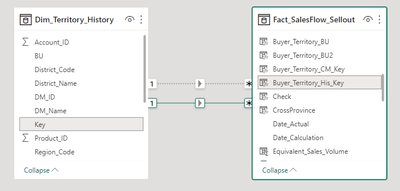
I have two tables. Territory and Sales. I wanna create a column in Sales table named BU from Territory table.

Poisson_pbi_0-1672481531224.png

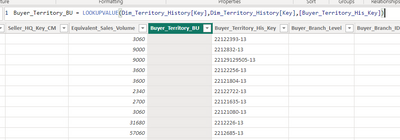
I use LOOKUPVALUE like below, but it returns all blank.

Poisson_pbi_0-1672480283364.png

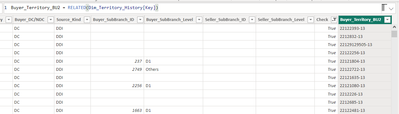
When I bulid a 1:* relationship between these two tables and use RELATED, it works well. In my model there is the other relationship, I make it inactive and bulid this one for testing.

Poisson_pbi_1-1672480500391.png

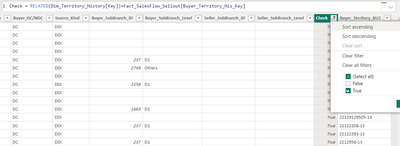
I also checked if there are invisible blanks or sth with RELATED, nothing wrong was found.

Poisson_pbi_2-1672480592163.png

In the community, there are also some questions like LOOKUPVALUE not working, but no good answers for my question. 

I wish someone master could help me. Thank you in advance.

3 REPLIES 3
Jihwan_Kim
Super User
Super User

Hi,

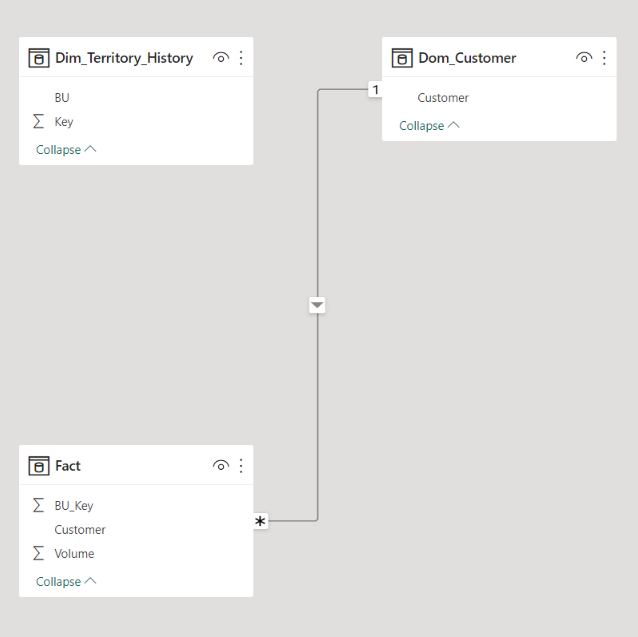
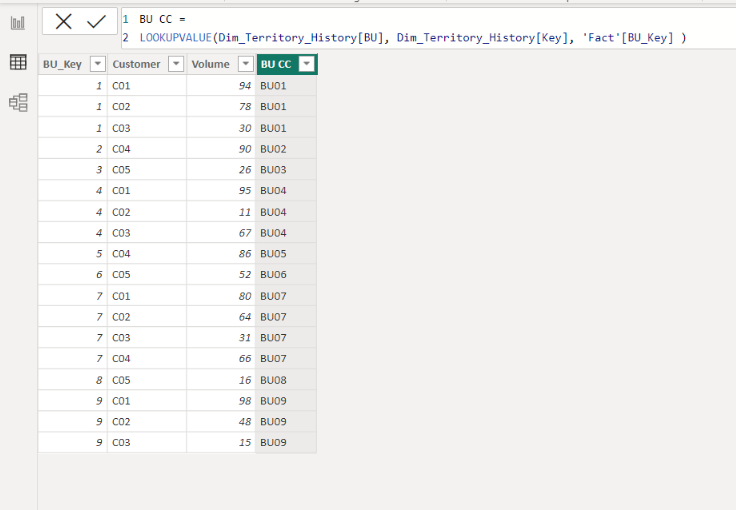
I am not sure how your datamodel looks like, but I tried to creae a sample pbix file like below.

Please check the below picture and the attached pbix file.

It is for creating a new column.

I hope the below can provide some ideas on how to create a solution for your data model.


Jihwan_Kim_1-1672481684733.png


Jihwan_Kim_2-1672481771907.png


BU CC = 
LOOKUPVALUE(Dim_Territory_History[BU], Dim_Territory_History[Key], 'Fact'[BU_Key] )


If this post helps, then please consider accepting it as the solution to help other members find it faster, and give a big thumbs up.


Click here to visit my LinkedIn page

Anonymous
Not applicable

When I simulated some data myself, LOOKUPVALUE also works well. But in my model, it doesn't work.

Hi,

Thank you for your message.

Please share your sample pbix file's link here, and then I can try to look into it to come up with a more accurate solution.

Thanks.


If this post helps, then please consider accepting it as the solution to help other members find it faster, and give a big thumbs up.


Click here to visit my LinkedIn page

Helpful resources

Announcements
Join our Fabric User Panel

Join our Fabric User Panel

Share feedback directly with Fabric product managers, participate in targeted research studies and influence the Fabric roadmap.

February Power BI Update Carousel

Power BI Monthly Update - February 2026

Check out the February 2026 Power BI update to learn about new features.

FabCon Atlanta 2026 carousel

FabCon Atlanta 2026

Join us at FabCon Atlanta, March 16-20, for the ultimate Fabric, Power BI, AI and SQL community-led event. Save $200 with code FABCOMM.