

Join us at FabCon Atlanta from March 16 - 20, 2026, for the ultimate Fabric, Power BI, AI and SQL community-led event. Save $200 with code FABCOMM.
Register now!The Power BI Data Visualization World Championships is back! Get ahead of the game and start preparing now! Learn more
HI!
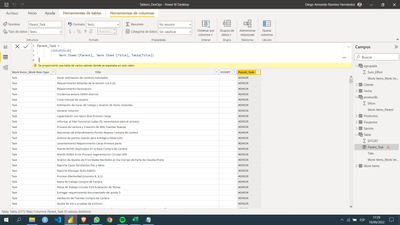
Im trying to add a new columns on a calculate table using group by. But, when I trying to adding the new columns with LOOKUPVALUE Power BI dont make the search.
Any idea?
Solved! Go to Solution.
Hi @dramirezkon ,
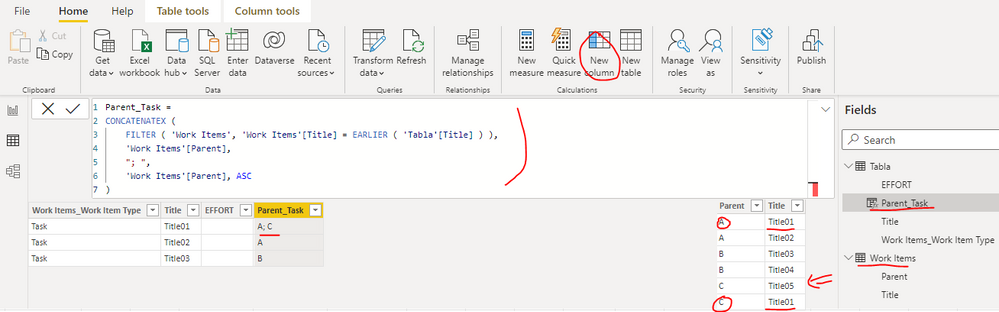
According to the error message, it seems that some titles may refer multiple Parent tasks, so please update the calculated column of the table "Tabla" as below:
Parent_Task =
CONCATENATEX (
FILTER ( 'Work Items', 'Work Items'[Title] = EARLIER ( 'Tabla'[Title] ) ),
'Work Items'[Parent],
"; ",
'Work Items'[Parent], ASC
)
Best Regards
Hi @dramirezkon ,
According to the error message, it seems that some titles may refer multiple Parent tasks, so please update the calculated column of the table "Tabla" as below:
Parent_Task =
CONCATENATEX (
FILTER ( 'Work Items', 'Work Items'[Title] = EARLIER ( 'Tabla'[Title] ) ),
'Work Items'[Parent],
"; ",
'Work Items'[Parent], ASC
)
Best Regards
That´s worked!!!
Thks
I tried it but was wrong to, the error was "The column 'Work Items'[Parent] doesnt exist
Hi @dramirezkon
Are those two tables connected? Try to use the RELATED('Work Items'[Parent])
If this post helps, please consider accepting it as the solution to help the other members find it more quickly.
Appreciate your Kudos!!
The Power BI Data Visualization World Championships is back! Get ahead of the game and start preparing now!
| User | Count |
|---|---|
| 14 | |
| 5 | |
| 5 | |
| 3 | |
| 3 |
| User | Count |
|---|---|
| 24 | |
| 10 | |
| 10 | |
| 6 | |
| 6 |