Join us at FabCon Atlanta from March 16 - 20, 2026, for the ultimate Fabric, Power BI, AI and SQL community-led event. Save $200 with code FABCOMM.
Register now!The Power BI Data Visualization World Championships is back! Get ahead of the game and start preparing now! Learn more
Hi all,
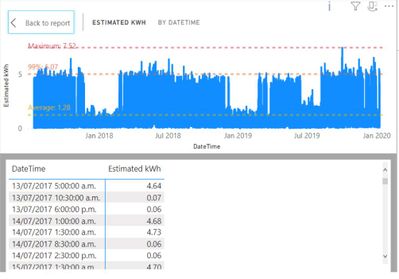
I am trying to create a table similar to the line graph's as below:
However this line graph is filtered by a slicer and depending on the filter applied, the estimated kWh would differ.
Eg filter: ID: 0001,0002,0003,0004
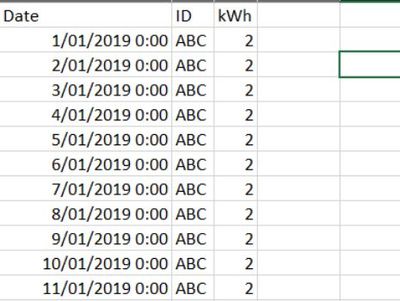
The underlying data is something like the below, where we have thousands of unique meter IDs with their kWh at different date time.
What I'm trying to achieve is whether I am able to create a table of sum of kWh at each datetime (as per the line graph table) , but keeping the filter that was applied, so that i can make another column of "actual kWh" in another column, and sum them up to be displayed on the graph (i.e. estimated plus actual kWh).
Hopefully I explained it well, let me know if need more explaination.
Thanks team. Appreciate if someone could help.
Kind regards,
Eric
Nope, I am not following this. Please see this post regarding How to Get Your Question Answered Quickly: https://community.powerbi.com/t5/Community-Blog/How-to-Get-Your-Question-Answered-Quickly/ba-p/38490
Thanks Greg. I will try again, and have attached the pbix file for context :
1. I have metered data for a few different sites (identified by MeterSerialNumber1)
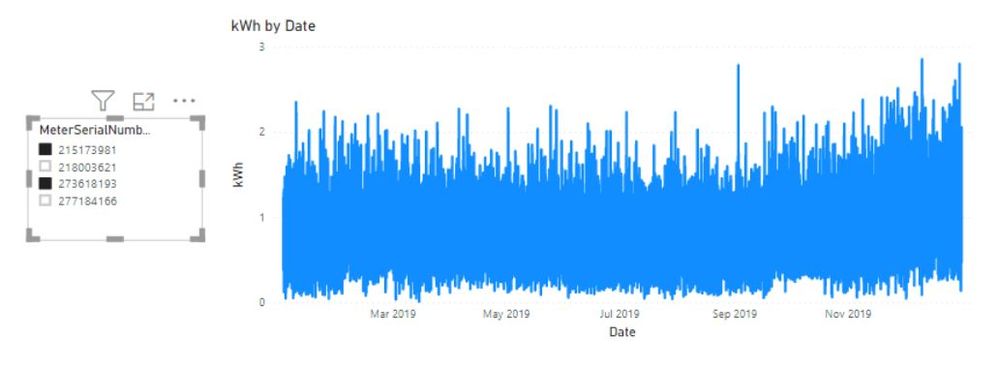
2. I plot them as a line chart to get :
Note that I have filters on the MeterSerialNumber1
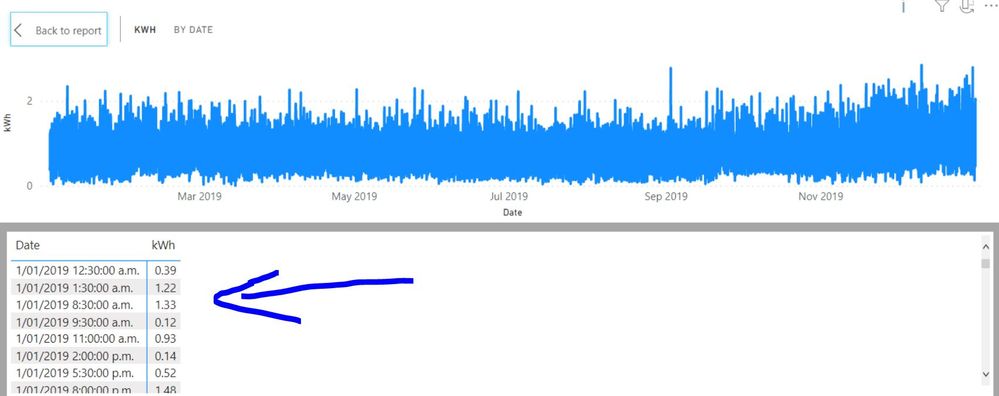
3. For the line chart, if I click "Show as a table", the table shown as below:
Which is a sum of kWh for all the filtered MeterSerialNumber1 grouped by the Date.
My problem is:
I want to create a NEW table as pointed by the blue arrow above. But keeping in mind that it varies with different combination of MeterSerialNumber1 selected. i.e. kWh column for 1/1/2019 12:30:00 a.m. will differ with different combination based on filter on slicer.
The next step for me is so that I can add another column of values (in this case, will be estimated kWh), then I can do a "calculated" New Column (actual + estimated).
Thanks.
Hi there
I am experiencing a similiar issue. I have tried using SUMMARIZECOLUMNS(Table['Date'],AnotherTableThatHasDataLinkandSlicersApplied,'kWh',SUM(Table['kWh']) and SUMMARIZECOLUMNS(Table['Date'],'kWh',SUM(Table['kWh']). Are these even the right functions?
I, like you, just want to make a table that is has same results as what is showing when select 'Show Data' on graph
Any help would be greatly apprecaited, this is driving me nuts!
Check out the November 2025 Power BI update to learn about new features.
Advance your Data & AI career with 50 days of live learning, contests, hands-on challenges, study groups & certifications and more!
| User | Count |
|---|---|
| 21 | |
| 10 | |
| 9 | |
| 4 | |
| 4 |
| User | Count |
|---|---|
| 34 | |
| 31 | |
| 20 | |
| 13 | |
| 11 |