This time we’re going bigger than ever. Fabric, Power BI, SQL, AI and more. We're covering it all. You won't want to miss it.
Learn moreDid you hear? There's a new SQL AI Developer certification (DP-800). Start preparing now and be one of the first to get certified. Register now
Hi All,
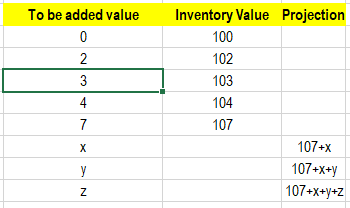
I need to build a dynamic column with iterative values as below. I already have "To be added value" and "Inventory Value". Need to build the "Projection" column through dax. Please help on how to get to this result:
Any help would be great. Thanks!
Solved! Go to Solution.
Hello @Vaibhav3008,
If you can add an additional column called "row number", your problem may be solved like this:
Here's the [DAX] code in the text format for convenience:
projection =
VAR current_row_number = [row number]
VAR last_inv_value_index = MAXX ( FILTER ( ALL ( data ), NOT ( ISBLANK ( data[inventory value] ) ) ), [row number] )
VAR base = LOOKUPVALUE ( data[inventory value], data[row number], last_inv_value_index )
VAR surplus = CALCULATE ( SUM ( data[to be added value] ), ALL ( data ), data[row number] > last_inv_value_index, data[row number] <= current_row_number )
VAR result = IF ( ISBLANK( data[inventory value] ), base + surplus, BLANK () )
RETURN resultIf a new column is not an option, you will need a more complex solution.
Best Regards,
Alexander
Thanks for the help. It's working!
Hello @Vaibhav3008,
If you can add an additional column called "row number", your problem may be solved like this:
Here's the [DAX] code in the text format for convenience:
projection =
VAR current_row_number = [row number]
VAR last_inv_value_index = MAXX ( FILTER ( ALL ( data ), NOT ( ISBLANK ( data[inventory value] ) ) ), [row number] )
VAR base = LOOKUPVALUE ( data[inventory value], data[row number], last_inv_value_index )
VAR surplus = CALCULATE ( SUM ( data[to be added value] ), ALL ( data ), data[row number] > last_inv_value_index, data[row number] <= current_row_number )
VAR result = IF ( ISBLANK( data[inventory value] ), base + surplus, BLANK () )
RETURN resultIf a new column is not an option, you will need a more complex solution.
Best Regards,
Alexander
Check out the April 2026 Power BI update to learn about new features.
Sign up to receive a private message when registration opens and key events begin.
If you have recently started exploring Fabric, we'd love to hear how it's going. Your feedback can help with product improvements.
| User | Count |
|---|---|
| 6 | |
| 5 | |
| 5 | |
| 3 | |
| 1 |
| User | Count |
|---|---|
| 15 | |
| 7 | |
| 7 | |
| 6 | |
| 5 |