Get certified for free when you join Fabric Data Days 2026 and dive into Fabric, Power BI, SQL, AI, and other essential data skills.
Join nowTry your skills in the Power BI Dataviz World Championship! Round one ends June 26. Join now
Iterative Calculation
Hello all!
I could use some help with doing a calculation which I believe will end up being iterative.
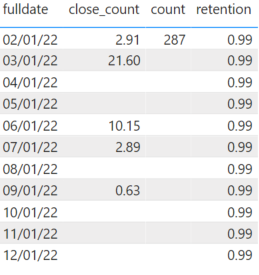
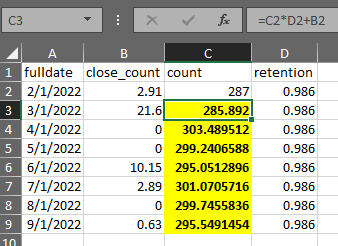
In the table below, I would like to populate the count column (or a new column being that it’s a calculation) that takes the previous months (count * retention) + close_count
I am able to easily do this in excel but am not sure how to execute this in DAX.
I have included a project file for reference.
Any assistance with this would be greatly appreciated!
File: https://www.dropbox.com/s/p7yp3u066a1owu4/power_bi_example.pbix?dl=0
Solved! Go to Solution.
Thank you for providing sample data. (Next time please sanitize it)
This is impossible to do in Power BI DAX but relatively easy to achieve in Power Query M.
let
Source = Table.FromRows(Json.Document(Binary.Decompress(Binary.FromText("dc67DcAwCATQXagtzOH4wyyR918jTuMkKDRc8Q7EeZJoFmRVSqRsuGP0NYXNaKZVKE8B3GTlh4/NXmoobQuEUT3310vDvI7wrG0RbsUpJNoDQtFfmRc=", BinaryEncoding.Base64), Compression.Deflate)), let _t = ((type nullable text) meta [Serialized.Text = true]) in type table [fulldate = _t, close_count = _t, count = _t, retention = _t]),
#"Changed Type" = Table.TransformColumnTypes(Source,{{"fulldate", type date}, {"close_count", type number}, {"count", type number}, {"retention", type number}}),
#"Replaced Value" = Table.ReplaceValue(#"Changed Type",null,0,Replacer.ReplaceValue,{"close_count"}),
#"Added Index" = Table.AddIndexColumn(#"Replaced Value", "Index", 0, 1, Int64.Type),
#"Added Custom" = Table.AddColumn(#"Added Index", "Count2", each List.Accumulate({1..[Index]},287,(state,current)=> state * #"Added Index"{current-1}[retention] + #"Added Index"{current-1}[close_count]))
in
#"Added Custom"
Thank you for providing sample data. (Next time please sanitize it)
This is impossible to do in Power BI DAX but relatively easy to achieve in Power Query M.
let
Source = Table.FromRows(Json.Document(Binary.Decompress(Binary.FromText("dc67DcAwCATQXagtzOH4wyyR918jTuMkKDRc8Q7EeZJoFmRVSqRsuGP0NYXNaKZVKE8B3GTlh4/NXmoobQuEUT3310vDvI7wrG0RbsUpJNoDQtFfmRc=", BinaryEncoding.Base64), Compression.Deflate)), let _t = ((type nullable text) meta [Serialized.Text = true]) in type table [fulldate = _t, close_count = _t, count = _t, retention = _t]),
#"Changed Type" = Table.TransformColumnTypes(Source,{{"fulldate", type date}, {"close_count", type number}, {"count", type number}, {"retention", type number}}),
#"Replaced Value" = Table.ReplaceValue(#"Changed Type",null,0,Replacer.ReplaceValue,{"close_count"}),
#"Added Index" = Table.AddIndexColumn(#"Replaced Value", "Index", 0, 1, Int64.Type),
#"Added Custom" = Table.AddColumn(#"Added Index", "Count2", each List.Accumulate({1..[Index]},287,(state,current)=> state * #"Added Index"{current-1}[retention] + #"Added Index"{current-1}[close_count]))
in
#"Added Custom"
@lbendlinAs a follow-up, I see that you have the value 287 hard coded in. Is it possible to select the value in the first row of the 'count' colum instead?
sure
let
Source = Table.FromRows(Json.Document(Binary.Decompress(Binary.FromText("dc67DcAwCATQXagtzOH4wyyR918jTuMkKDRc8Q7EeZJoFmRVSqRsuGP0NYXNaKZVKE8B3GTlh4/NXmoobQuEUT3310vDvI7wrG0RbsUpJNoDQtFfmRc=", BinaryEncoding.Base64), Compression.Deflate)), let _t = ((type nullable text) meta [Serialized.Text = true]) in type table [fulldate = _t, close_count = _t, count = _t, retention = _t]),
#"Changed Type" = Table.TransformColumnTypes(Source,{{"fulldate", type date}, {"close_count", type number}, {"count", type number}, {"retention", type number}}),
#"Replaced Value" = Table.ReplaceValue(#"Changed Type",null,0,Replacer.ReplaceValue,{"close_count"}),
#"Added Index" = Table.AddIndexColumn(#"Replaced Value", "Index", 0, 1, Int64.Type),
#"Added Custom" = Table.AddColumn(#"Added Index", "Count2", each List.Accumulate({1..[Index]},#"Added Index"{0}[count],(state,current)=> state * #"Added Index"{current-1}[retention] + #"Added Index"{current-1}[close_count]))
in
#"Added Custom"
Don't miss out on Data Days, June 15 through August 7. Learn Fabric, Power BI, SQL, AI and more.
Check out the May 2026 Power BI update to learn about new features.
| User | Count |
|---|---|
| 3 | |
| 2 | |
| 2 | |
| 1 | |
| 1 |