cancel
Showing results for 
Search instead for 
Did you mean: 

Learn from the best! Meet the four finalists headed to the FINALS of the Power BI Dataviz World Championships! Register now

Reply
tangcy123
Helper I
Helper I

Is something wrong for Amount DAX code

Hi,

1. I add a slicer and stacked column chart.

2. slicer have parameters for Range

Range = GENERATESERIES(0, 5000, 1000)
RangeValue = SELECTEDVALUE('Range'[Range])
3. Create measure for Amount
Amount =
VAR X=ADDCOLUMNS(ALL('Order'[total_amount]),"COUNT1",CALCULATE(DISTINCTCOUNT('Order'[order_no])))
RETURN
COUNTROWS(
FILTER(
X, [COUNT1] ='Range'[RangeValue]
 
 
)
)
 

Question:

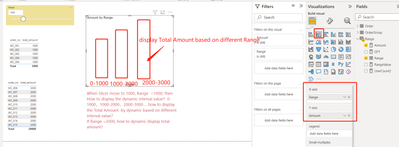
When Slicer move to 1000, Range =1000, then How to display the dynamic interval value? 0-1000,1000-2000,2000-3000 ... how to display the Total Amount by dynamic based on different interval value?

If Range =2000, how to dynamic display total amount?

Issue: is something wrong for Amount DAX code?


tangcy123_0-1657101478657.png


1 REPLY 1
tamerj1
Community Champion
Community Champion

@tangcy123 

The ranges table should contain 3 columns, the range name, the min range and the max range. Then you can use IF to check the value is btween the min an max limits. 
you can use the name column to slice by in a table or slicer

Helpful resources

Announcements
Join our Fabric User Panel

Join our Fabric User Panel

Share feedback directly with Fabric product managers, participate in targeted research studies and influence the Fabric roadmap.

February Power BI Update Carousel

Power BI Monthly Update - February 2026

Check out the February 2026 Power BI update to learn about new features.

FabCon Atlanta 2026 carousel

FabCon Atlanta 2026

Join us at FabCon Atlanta, March 16-20, for the ultimate Fabric, Power BI, AI and SQL community-led event. Save $200 with code FABCOMM.