Join us at FabCon Atlanta from March 16 - 20, 2026, for the ultimate Fabric, Power BI, AI and SQL community-led event. Save $200 with code FABCOMM.
Register now!The Power BI Data Visualization World Championships is back! Get ahead of the game and start preparing now! Learn more
hello,
I am trying to transform the following Oracle SQL function into DAX but without any success. Could you please help me how to solve it? The functionality of this field should be like that you input account value into ${account} and then it shows you relevant result.
SELECT
sum(CASE
WHEN "accountMD" = ${account} THEN -1*"amount"
ELSE "amount"
END
) OVER (PARTITION BY "businessPartnerNumber") AS SUM
FROM Table
Thank you,
Martin
Solved! Go to Solution.
Hi @Anonymous ,
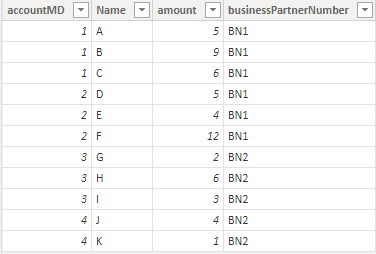
I created some data:
Table:
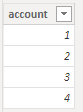
Table2:
Here are the steps you can follow:
1. Use [account] of Table2 as a slicer.
2. Create measure.
if_Measure =
var _select=SELECTEDVALUE('Table 2'[account])
return
IF(
MAX('Table'[accountMD])=_select,-1*MAX('Table'[amount]),MAX('Table'[amount]))SUM =
SUMX(FILTER(ALL('Table'),'Table'[businessPartnerNumber]=MAX('Table'[businessPartnerNumber])),[if_Measure])
3. Result:
Best Regards,
Liu Yang
If this post helps, then please consider Accept it as the solution to help the other members find it more quickly
Hi @Anonymous ,
I created some data:
Table:
Table2:
Here are the steps you can follow:
1. Use [account] of Table2 as a slicer.
2. Create measure.
if_Measure =
var _select=SELECTEDVALUE('Table 2'[account])
return
IF(
MAX('Table'[accountMD])=_select,-1*MAX('Table'[amount]),MAX('Table'[amount]))SUM =
SUMX(FILTER(ALL('Table'),'Table'[businessPartnerNumber]=MAX('Table'[businessPartnerNumber])),[if_Measure])
3. Result:
Best Regards,
Liu Yang
If this post helps, then please consider Accept it as the solution to help the other members find it more quickly
The Power BI Data Visualization World Championships is back! Get ahead of the game and start preparing now!
Check out the November 2025 Power BI update to learn about new features.
| User | Count |
|---|---|
| 20 | |
| 11 | |
| 10 | |
| 4 | |
| 4 |
| User | Count |
|---|---|
| 33 | |
| 30 | |
| 19 | |
| 12 | |
| 11 |