cancel
Showing results for 
Search instead for 
Did you mean: 

The Power BI Data Visualization World Championships is back! Get ahead of the game and start preparing now! Learn more

Reply
Anonymous
Not applicable

Increasing Specific Values

I have a problem I cant seem to solve with my limited DAX knowledge.


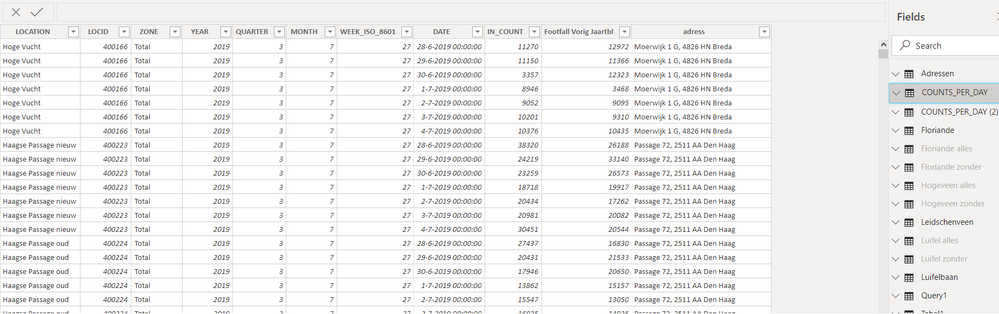
I am trying to increase the IN_COUNT values of some specific locations in this table in a new column Naamloos1.png


I want to increase the IN_COUNT according to the percentages in the table below (But only the locations that match with the locations in the first Table above) All the other locations in the first picture that are not in this table need to keep their original IN_COUNT value.

So the new column should show a new IN_COUNT value if the locations are the same, if the location is not in the second table the new IN_COUNT should stay the same as before.

Naamloos2.png


I have tried some DAX formulas but cant seem to find a solution to do this.

1 ACCEPTED SOLUTION
Nathaniel_C
Community Champion
Community Champion

Hi @Anonymous ,

Try using LOOKUPVALUE() Lookup  I would break this into two columns, so that you are comfortable with what you are doing, and then after combine the two formulas into 1. First use LOOKUPVALUE  () to search the other table for the name of the city based on the test column and the value it is looking up is the city in your first table. Return a zero perhaps if not found. Then the if looks at that column and if there is a city name, get the value from the other table, else keep the value from your first table. 


If this solves your issues, please mark it as the solution, so that others can find it easily. Kudos are nice too.
Nathaniel


Did I answer your question? Mark my post as a solution!

Proud to be a Super User!


View solution in original post

1 REPLY 1
Nathaniel_C
Community Champion
Community Champion

Hi @Anonymous ,

Try using LOOKUPVALUE() Lookup  I would break this into two columns, so that you are comfortable with what you are doing, and then after combine the two formulas into 1. First use LOOKUPVALUE  () to search the other table for the name of the city based on the test column and the value it is looking up is the city in your first table. Return a zero perhaps if not found. Then the if looks at that column and if there is a city name, get the value from the other table, else keep the value from your first table. 


If this solves your issues, please mark it as the solution, so that others can find it easily. Kudos are nice too.
Nathaniel


Did I answer your question? Mark my post as a solution!

Proud to be a Super User!


Helpful resources

Announcements
Power BI DataViz World Championships

Power BI Dataviz World Championships

The Power BI Data Visualization World Championships is back! Get ahead of the game and start preparing now!

December 2025 Power BI Update Carousel

Power BI Monthly Update - December 2025

Check out the December 2025 Power BI Holiday Recap!

FabCon Atlanta 2026 carousel

FabCon Atlanta 2026

Join us at FabCon Atlanta, March 16-20, for the ultimate Fabric, Power BI, AI and SQL community-led event. Save $200 with code FABCOMM.