Join us at FabCon Atlanta from March 16 - 20, 2026, for the ultimate Fabric, Power BI, AI and SQL community-led event. Save $200 with code FABCOMM.
Register now!The Power BI Data Visualization World Championships is back! Get ahead of the game and start preparing now! Learn more
Hello everyone I have 3 tables,
revenue table
platform A names
Platform A billing
i will share powerbi file here : https://1drv.ms/u/s!Ag9tIyk2ofNRjmSCZuLgVHpG6N3V?e=LVuOgR
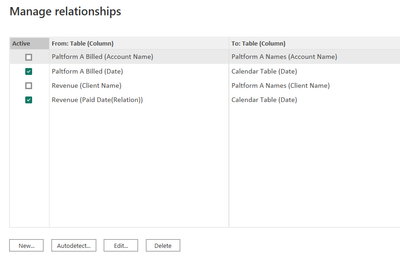
i have relationship like this:
i cant make it active on my main dashboard beacsue of many to many card error so i am simulating what my main dashboard is like so i want to keep them inactive.
anyways i made a formula
Rel Revenues = CALCULATE( SUM(Revenue[Total]),USERELATIONSHIP(Revenue[Client Name],'Paltform A Names'[Client Name]),Revenue[Platform] = "Platform A")but this gives me the wrong total it doesnt give me client A and Client B from the platform A name which are in the relatiosnhip it just give me all of platform A total which is 179,408.53 instad of giving me 103,812.2. what am i doing wrong?
and this also happens with the platform A billed which is giving me 150,013.2 instead of 98,924 for only name A and B
Rel Billed = CALCULATE(SUM('Paltform A Billed'[Billed]),USERELATIONSHIP('Paltform A Billed'[Account Name],'Paltform A Names'[Account Name]))Solved! Go to Solution.
Yes you are right. Please try
Rel Revenues =
CALCULATE (
SUM ( Revenue[Total] ),
USERELATIONSHIP ( Revenue[Client Name], 'Paltform A Names'[Client Name] ),
Revenue[Platform] = "Platform A",
Revenue[Client Name] IN VALUES ( 'Paltform A Names'[Client Name] )
)
Hi @eliasayyy
please try
Rel Revenues =
CALCULATE (
SUM ( Revenue[Total] ),
USERELATIONSHIP ( Revenue[Client Name], 'Paltform A Names'[Client Name] ),
Revenue[Platform] = "Platform A",
Revenue[Client Name] <> BLANK ()
)
hello thank you for your reply but it still is giving me 179,000 instead of 103,000
Yes you are right. Please try
Rel Revenues =
CALCULATE (
SUM ( Revenue[Total] ),
USERELATIONSHIP ( Revenue[Client Name], 'Paltform A Names'[Client Name] ),
Revenue[Platform] = "Platform A",
Revenue[Client Name] IN VALUES ( 'Paltform A Names'[Client Name] )
)
The Power BI Data Visualization World Championships is back! Get ahead of the game and start preparing now!
Check out the November 2025 Power BI update to learn about new features.
| User | Count |
|---|---|
| 19 | |
| 10 | |
| 9 | |
| 4 | |
| 4 |
| User | Count |
|---|---|
| 34 | |
| 32 | |
| 20 | |
| 12 | |
| 11 |