Join us at FabCon Atlanta from March 16 - 20, 2026, for the ultimate Fabric, Power BI, AI and SQL community-led event. Save $200 with code FABCOMM.
Register now!The Power BI Data Visualization World Championships is back! It's time to submit your entry. Live now!
Hi, I have two tables, the first is like this:
| Country | Sales |
| France | £10000 |
| UK | £5500 |
UK | £6000 |
Italy | £2000 |
I then have a second table:
| Country | Code |
| France | FR |
| UK | UK |
I create a relationship between the tables and want to make a complete table like this:
| Country | Sales | Code |
| France | £10000 | FR |
| UK | £5500 | UK |
UK | £6000 | UK |
Italy | £2000 |
There is no mapping for Italy. Above is the result I want. The result I get is:
| Country | Sales | Code |
| France | £10000 | FR |
| UK | £5500 | UK |
UK | £6000 | UK |
Italy is excluded as it has no mapping value. How can I make it so if there is no mapping value it just returns blank and the table simply fills in what it can. Thanks.
Solved! Go to Solution.
Hi @ompowerbi ,
Here are the steps you can follow:
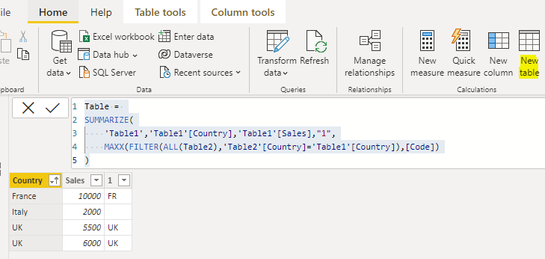
1. Create calculated table.
Table =
SUMMARIZE(
'Table1','Table1'[Country],'Table1'[Sales],"1",
MAXX(FILTER(ALL(Table2),'Table2'[Country]='Table1'[Country]),[Code])
)
2. Result:
Best Regards,
Liu Yang
If this post helps, then please consider Accept it as the solution to help the other members find it more quickly
Hi @ompowerbi ,
Here are the steps you can follow:
1. Create calculated table.
Table =
SUMMARIZE(
'Table1','Table1'[Country],'Table1'[Sales],"1",
MAXX(FILTER(ALL(Table2),'Table2'[Country]='Table1'[Country]),[Code])
)
2. Result:
Best Regards,
Liu Yang
If this post helps, then please consider Accept it as the solution to help the other members find it more quickly
Genius
Hi @ompowerbi ,
Can you try "Merge query" in Power query editor to get the "Code" column and then filter the row that are not blank....
Thanks,
AnthonyJoseph
Thank you, bit unsure of how Merge Query works I apologise
The Power BI Data Visualization World Championships is back! It's time to submit your entry.
Check out the January 2026 Power BI update to learn about new features.
| User | Count |
|---|---|
| 10 | |
| 7 | |
| 4 | |
| 3 | |
| 3 |
| User | Count |
|---|---|
| 19 | |
| 14 | |
| 11 | |
| 10 | |
| 7 |