FabCon is coming to Atlanta
Join us at FabCon Atlanta from March 16 - 20, 2026, for the ultimate Fabric, Power BI, AI and SQL community-led event. Save $200 with code FABCOMM.
Register now!- Power BI forums
- Get Help with Power BI
- Desktop
- Service
- Report Server
- Power Query
- Mobile Apps
- Developer
- DAX Commands and Tips
- Custom Visuals Development Discussion
- Health and Life Sciences
- Power BI Spanish forums
- Translated Spanish Desktop
- Training and Consulting
- Instructor Led Training
- Dashboard in a Day for Women, by Women
- Galleries
- Data Stories Gallery
- Themes Gallery
- Contests Gallery
- QuickViz Gallery
- Quick Measures Gallery
- Visual Calculations Gallery
- Notebook Gallery
- Translytical Task Flow Gallery
- TMDL Gallery
- R Script Showcase
- Webinars and Video Gallery
- Ideas
- Custom Visuals Ideas (read-only)
- Issues
- Issues
- Events
- Upcoming Events
The Power BI Data Visualization World Championships is back! Get ahead of the game and start preparing now! Learn more
- Power BI forums
- Forums
- Get Help with Power BI
- DAX Commands and Tips
- Improve performance of Cumulative formula
- Subscribe to RSS Feed
- Mark Topic as New
- Mark Topic as Read
- Float this Topic for Current User
- Bookmark
- Subscribe
- Printer Friendly Page


- Mark as New
- Bookmark
- Subscribe
- Mute
- Subscribe to RSS Feed
- Permalink
- Report Inappropriate Content
Improve performance of Cumulative formula

The below formula seems to be working fine, But is very slow , can anyone suggest ways to improve.
https://drive.google.com/file/d/1C4cKXalkDq95yFt5BWdVwwoxL0oAiJ8U/view?usp=sharing
Solved! Go to Solution.


- Mark as New
- Bookmark
- Subscribe
- Mute
- Subscribe to RSS Feed
- Permalink
- Report Inappropriate Content
Here is a different way to write it that gets the same result. Please check if its is more performant with your actual data.
New Measure =
VAR summary =
ADDCOLUMNS (
SUMMARIZE (
'Date',
'Date'[Year],
'Date'[MonthName],
"maxdate", MAX ( 'Date'[Date] )
),
"@result",
VAR maxdate = [maxdate]
RETURN
CALCULATE (
SUM ( 'To Collect'[To Collect] ),
ALLSELECTED ( 'Date'[Date] ),
'Date'[Date] <= maxdate
)
- CALCULATE (
SUM ( 'Unapplied Receipts'[AdvPayment] )
)
)
RETURN
SUMX (
FILTER (
summary,
[@result] > 0
),
[@result]
)
Regards,
Pat
Did I answer your question? Mark my post as a solution! Kudos are also appreciated!
To learn more about Power BI, follow me on Twitter or subscribe on YouTube.
@mahoneypa HoosierBI on YouTube
- Mark as New
- Bookmark
- Subscribe
- Mute
- Subscribe to RSS Feed
- Permalink
- Report Inappropriate Content


- Mark as New
- Bookmark
- Subscribe
- Mute
- Subscribe to RSS Feed
- Permalink
- Report Inappropriate Content
Please try and check if it is faster...
Cumulative Net To Collect =
VAR CurrentDate = MAX ( Date[date] )
VAR CumulCollect = CALCULATE (
SUM ( Table[Net Cumulative To Collect] ),
FILTER ( ALL ( Table), Date[date] <= CurrentDate )
)
RETURN
CumulCollect
- Mark as New
- Bookmark
- Subscribe
- Mute
- Subscribe to RSS Feed
- Permalink
- Report Inappropriate Content
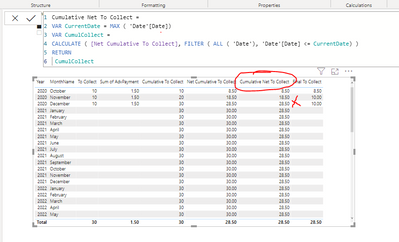
This formula is giving incorrect results
- Mark as New
- Bookmark
- Subscribe
- Mute
- Subscribe to RSS Feed
- Permalink
- Report Inappropriate Content
When a measure refer to other measure, sometime unexpected result comes. Maybe trying it again with actual formula instead of [Net Cumulative To Collect] might work. I recomend to test the fomular with simple table first,
- Mark as New
- Bookmark
- Subscribe
- Mute
- Subscribe to RSS Feed
- Permalink
- Report Inappropriate Content
I have attached the sample file in the link, could you please suggest , how to make it work
- Mark as New
- Bookmark
- Subscribe
- Mute
- Subscribe to RSS Feed
- Permalink
- Report Inappropriate Content
Here is a different way to write it that gets the same result. Please check if its is more performant with your actual data.
New Measure =
VAR summary =
ADDCOLUMNS (
SUMMARIZE (
'Date',
'Date'[Year],
'Date'[MonthName],
"maxdate", MAX ( 'Date'[Date] )
),
"@result",
VAR maxdate = [maxdate]
RETURN
CALCULATE (
SUM ( 'To Collect'[To Collect] ),
ALLSELECTED ( 'Date'[Date] ),
'Date'[Date] <= maxdate
)
- CALCULATE (
SUM ( 'Unapplied Receipts'[AdvPayment] )
)
)
RETURN
SUMX (
FILTER (
summary,
[@result] > 0
),
[@result]
)
Regards,
Pat
Did I answer your question? Mark my post as a solution! Kudos are also appreciated!
To learn more about Power BI, follow me on Twitter or subscribe on YouTube.
@mahoneypa HoosierBI on YouTube
- Mark as New
- Bookmark
- Subscribe
- Mute
- Subscribe to RSS Feed
- Permalink
- Report Inappropriate Content
Could you please kindly explain why this formula is performing well


- Mark as New
- Bookmark
- Subscribe
- Mute
- Subscribe to RSS Feed
- Permalink
- Report Inappropriate Content
Hi @Antmkjr
Are you sure your version of the measure is not performing well in terms of speed? I tried a few different options and measured them with the performance analyzer in Power BI and yours seems to be the fastest by quite a bit.
Please mark the question solved when done and consider giving a thumbs up if posts are helpful.
Contact me privately for support with any larger-scale BI needs, tutoring, etc.
Cheers


Helpful resources

Power BI Monthly Update - November 2025
Check out the November 2025 Power BI update to learn about new features.

Fabric Data Days
Advance your Data & AI career with 50 days of live learning, contests, hands-on challenges, study groups & certifications and more!

FabCon Atlanta 2026
Join us at FabCon Atlanta, March 16-20, for the ultimate Fabric, Power BI, AI and SQL community-led event. Save $200 with code FABCOMM.

| User | Count |
|---|---|
| 21 | |
| 10 | |
| 9 | |
| 4 | |
| 4 |


| User | Count |
|---|---|
| 34 | |
| 31 | |
| 20 | |
| 13 | |
| 11 |


