cancel
Showing results for 
Search instead for 
Did you mean: 

The Power BI Data Visualization World Championships is back! Get ahead of the game and start preparing now! Learn more

Reply
einrikr
Frequent Visitor

IF value is x then a and if value is y then b

Hi all,


I think I'm massively overcomplicating my problem but as I'm quite new to DAX, I'd love to learn what I'm doing wrong.

I want to do something presumably extremely basic, but can't fathom how to do it...


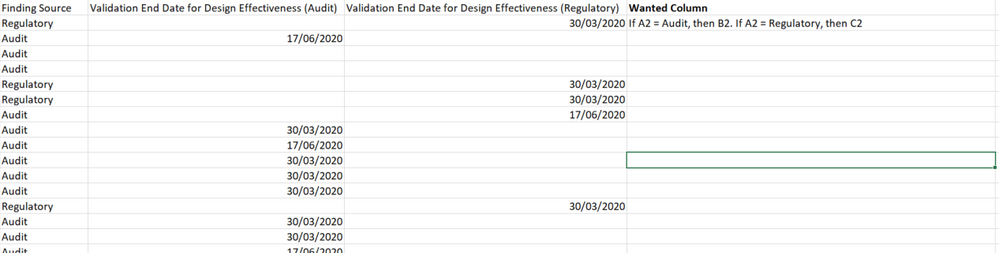
My report has a column with 2 possible values: audit, or regulatory. Based on these values, I want to retreive values in other columns. If the value is 'audit', I want to retreive the deadline for testing purposes, stored in column 'validation deadline audit'. 

If the valuw is 'regulatory', I want to retreive the deadline in column 'validation deadline regulatory'. 


It seems pretty simple to do but I don't get what I'm supposed to be using. Can anyone of you help please?

1 ACCEPTED SOLUTION
Anonymous
Not applicable

Hi @einrikr ,


I am going to assume that you want to evaluate everything on the same row. I would create a new calculated column.


Deadline = if([ColumnNameAuditorRegulatory]="Audit",[valididation deadline audit],[validatation deadline regulatory])


-Paul

View solution in original post

6 REPLIES 6
Anonymous
Not applicable

Hi @einrikr ,


I am going to assume that you want to evaluate everything on the same row. I would create a new calculated column.


Deadline = if([ColumnNameAuditorRegulatory]="Audit",[valididation deadline audit],[validatation deadline regulatory])


-Paul

Anonymous
Not applicable

Show the data model. We need to know how your tables are linked.

Best
D

Thanks for your reply @Anonymous darlove, see below.

It's all in one table, but somehow I still don't get what I should do... 


snip.PNG

Anonymous
Not applicable

@einrikr 

If it's all in one table, you can definitely use my formula above.

It certainly did, thank you very much! 


I expected that I would have to specify 'if value is x, then a or and if value is y, then b' but that's not the case 🙂 

Anonymous
Not applicable

Awesome. Glad it worked. But yes, the format for if statements are if(evaluation, result if true, result if false).


If you're using a switch function (for handling multiple ifs, then you'd have to specify the various values)...

switch([values],"Audit",[auditdatecolumn],"Value2",[value2datecolumn],"Value3",[value3datecolumn],"Alternate Value")

Helpful resources

Announcements
Power BI DataViz World Championships

Power BI Dataviz World Championships

The Power BI Data Visualization World Championships is back! Get ahead of the game and start preparing now!

December 2025 Power BI Update Carousel

Power BI Monthly Update - December 2025

Check out the December 2025 Power BI Holiday Recap!

FabCon Atlanta 2026 carousel

FabCon Atlanta 2026

Join us at FabCon Atlanta, March 16-20, for the ultimate Fabric, Power BI, AI and SQL community-led event. Save $200 with code FABCOMM.