cancel
Showing results for 
Search instead for 
Did you mean: 

Next up in the FabCon + SQLCon recap series: The roadmap for Microsoft SQL and Maximizing Developer experiences in Fabric. All sessions are available on-demand after the live show. Register now

Reply
kalspiros
Helper I
Helper I

IF that will ignore Grand Sum

Hello all,


Bit of a quick one, I am having a list of values, sick leave days taken through the year.

I have a measure that will sum them up per employee: Sick Leave Days:=SUM([values]) and sliced by employee.

I want to create the following IF: Sick Leave Adjusted:=IF([Sick Leave Days]>5,5,[Sick Leave Days]), in essence, eliminate any sick leave days over 5.

That works well but problem is, once in Grand Total of the pivot, [Sick Leave Adjusted] will return value 5 and not the adjusted sum.

I did try an iteration of it, (SUMX([Leave],IF([Sick Leave Days]>5,5,[Sick Leave Days]))) but that won't work since that only checks individual records rather than the SUM.

Another option I'm thinking is to use the SUMX above but then i'll have to head back to power query and group my values and sum them up by employee.

Any idea on DAX?


Cheers

1 ACCEPTED SOLUTION

Hi @kalspiros 


Replace the column you used in Row Labes (Column A) with [a column that you used in row].


IF that column is Name then use [Name]

If this post helps, please consider accepting it as the solution to help the other members find it more quickly.

Appreciate your Kudos!!


View solution in original post

4 REPLIES 4
kalspiros
Helper I
Helper I

Fantastic! many thanks @VahidDM that works wonders! Initially it was returning all 5's but the problem was with the [Sum Leave Days] measure, it all works fine now 🙂


Cheers!

VahidDM
Super User
Super User

Hi @kalspiros 


try this:


Sick Leave Adjusted =
IF(
    HASONEVALUE( [a column that you used in row] ),
    IF( [Sick Leave Days] > 5, 5, [Sick Leave Days] ),
    SUMX(
        SUMMARIZE(
            table,
            [a column that you used in row],
            "Leave", IF( [Sick Leave Days] > 5, 5, [Sick Leave Days] )
        ),
        [Leave]
    )
)


If this post helps, please consider accepting it as the solution to help the other members find it more quickly.

Appreciate your Kudos!!


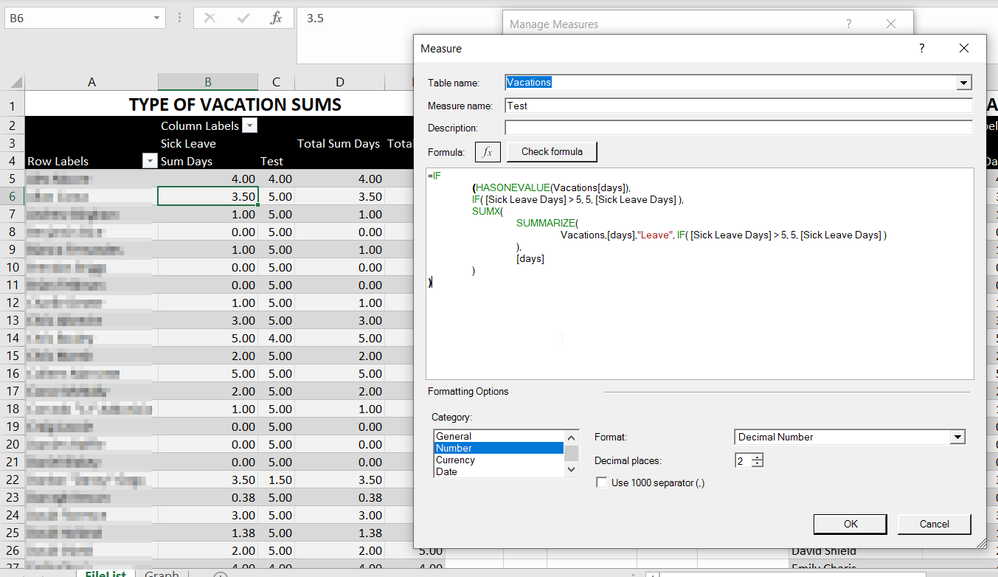
Thank you @VahidDM , apologies for the complete ignorance but i'm somehow lost due to HASONEVALUE which i can't get my head around it. what do you mean by 

[a column that you used in row]

?

I think i'm doing something wrong because the values that are coming up are rather funny

2021-11-01 11_44_17-Vacations.xlsx - Excel.png


Many thanks in advance

Hi @kalspiros 


Replace the column you used in Row Labes (Column A) with [a column that you used in row].


IF that column is Name then use [Name]

If this post helps, please consider accepting it as the solution to help the other members find it more quickly.

Appreciate your Kudos!!


Helpful resources

Announcements
New to Fabric survey Carousel

New to Fabric Survey

If you have recently started exploring Fabric, we'd love to hear how it's going. Your feedback can help with product improvements.

Power BI DataViz World Championships carousel

Power BI DataViz World Championships - June 2026

A new Power BI DataViz World Championship is coming this June! Don't miss out on submitting your entry.

FabCon and SQLCon Highlights Carousel

FabCon &SQLCon Highlights

Experience the highlights from FabCon & SQLCon, available live and on-demand starting April 14th.

March Power BI Update Carousel

Power BI Community Update - March 2026

Check out the March 2026 Power BI update to learn about new features.