Hello everyone,
I am trying to calculate some average times and it works well, except the Totals. Each row represents a candidate.
The table i have looks like this:
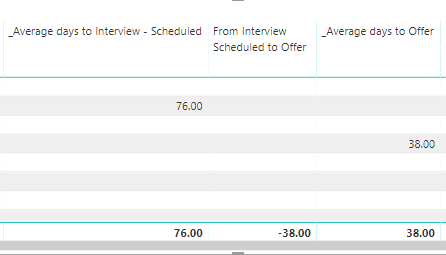
The formula I use for the column in the middle is:
From Interview Scheduled to Offer = IF ( ISBLANK([_Average days to Offer]) || ISBLANK([_Average days to Interview - Scheduled]), BLANK(),([_Average days to Offer] - [_Average days to Interview - Scheduled]))
The purpose of it is to ignore the calculation if the other column is blank and if that applies to give a blank result. Which works perfectly, except for the TOTALS. Is there something I can add to my formula so that the total is blank also unless the same candidate has both values?
The 1st and 3rd column are also calculations that apply to columns that contain whole numbers (number of days from application to Interview or Offer in this case) or null values, that apply to each candidate (as I said one row = 1 candidate)
_Average days to Interview - Scheduled = CALCULATE( AVERAGE([_Days Application to Interview - Scheduled]), FILTER(report, report[_Days Application to Interview - Scheduled] <> 0 ))
_Average days to Offer = CALCULATE( AVERAGE([_Days Application to Offer]), FILTER(report, report[_Days Application to Offer] <> 0 ))
I might be missing something here, can you please help?
Thank you very much!


