Join us at FabCon Atlanta from March 16 - 20, 2026, for the ultimate Fabric, Power BI, AI and SQL community-led event. Save $200 with code FABCOMM.
Register now!The Power BI Data Visualization World Championships is back! Get ahead of the game and start preparing now! Learn more
Below is the sample data we will use for this experiment, First Column are dates, the second one shows Categories and the last one shows values.
Date Categories Value
| 10/5/2022 | A | 25 |
| 11/2/2022 | B | 45 |
| 12/9/2022 | A | 35 |
| 12/15/2022 | A | 10 |
| 12/30/2022 | B | 40 |
| 1/5/2023 | A | 60 |
| 1/28/2023 | A | 5 |
| 2/1/2023 | B | 80 |
| 2/5/2023 | B | 15 |
| 2/9/2023 | B | 70 |
Data has two slicers Date and Categories. Below is the DAX statement I have used
Formula =
var new = sum(Test[Value]) * 10
var startyear = DATE(YEAR(TODAY()),1,1)
var firstD = CALCULATE( MIN( Test[Date]), ALLSELECTED(Test[Date]) )
return if( ISFILTERED(Test[Categories]) && firstD >= startyear, new, 0 )I am writing a DAX Statement to multiply column 3(values) by 10 only if the date range is in the current year 2023.
The StartYear gives the start of the current year, firstD gives the lowest date from the date slicer.
Now when I filter dates to 2023, the total value should be 2300 but it shows as 0, Image below
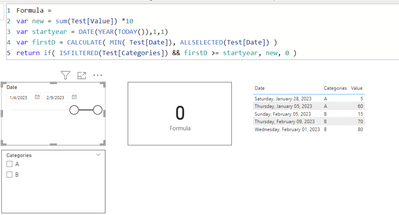
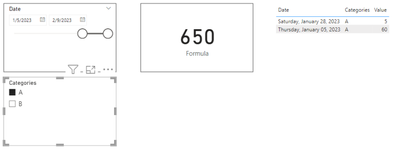
However, the DAX works when I select A or B, Image below
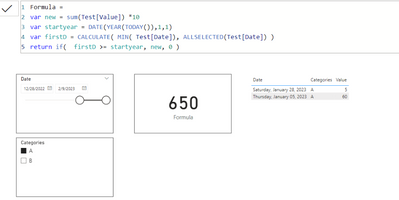
I have also tried removing ISFILTERED function from the measure even though it is mandatory for this measure to interact with the slicer, Now the value shows 650 when it is expected to be 0 because the year is 2022 and not 2023
Expected Function: I want the Measure to interact with both the date and category slicer and show (value) * 10 if the date slicer is greater than 1/1/2023 and 0 when in date slicer starts from any date of 2022. The result should work if the category slicer is selected or not selected.
Solved! Go to Solution.
Hi there @bipowerbix ,
So I think you can get the correct behaviour by:
Formula =
VAR new =
SUM ( Test[Value] ) * 10
VAR startyear =
DATE ( YEAR ( TODAY () ), 1, 1 )
VAR firstD =
CALCULATE (
MIN ( 'Date'[Date] ),
ALLSELECTED ( 'Date'[Date] )
)
RETURN
IF (
firstD >= startyear,
new,
0
-- Returning 0 is fine for use in a card or other visual displaying a single value,
-- but recommended in visuals that group by one or more columns.
)
Sample PBIX is attached.
Does this work for you?
Regards
Yes, That works, fixed it on my original file, what was happening was, the firstD part was not selecting the right date, and the numbers were being thrown off, I thought maybe the ISFILTERED() function might fix it.
VAR firstD =
CALCULATE (
MIN ( 'Date'[Date] ),
ALLSELECTED ( 'Date'[Date] )
)
Hi there @bipowerbix ,
So I think you can get the correct behaviour by:
Formula =
VAR new =
SUM ( Test[Value] ) * 10
VAR startyear =
DATE ( YEAR ( TODAY () ), 1, 1 )
VAR firstD =
CALCULATE (
MIN ( 'Date'[Date] ),
ALLSELECTED ( 'Date'[Date] )
)
RETURN
IF (
firstD >= startyear,
new,
0
-- Returning 0 is fine for use in a card or other visual displaying a single value,
-- but recommended in visuals that group by one or more columns.
)
Sample PBIX is attached.
Does this work for you?
Regards
The Power BI Data Visualization World Championships is back! Get ahead of the game and start preparing now!
| User | Count |
|---|---|
| 15 | |
| 8 | |
| 4 | |
| 4 | |
| 3 |
| User | Count |
|---|---|
| 23 | |
| 10 | |
| 10 | |
| 6 | |
| 5 |