cancel
Showing results for 
Search instead for 
Did you mean: 

The Power BI Data Visualization World Championships is back! Get ahead of the game and start preparing now! Learn more

Reply
rsderby68
Resolver I
Resolver I

How to transform a Power BI date column by range

Would someone give me a hand here? Still learning Power BI transformations. 


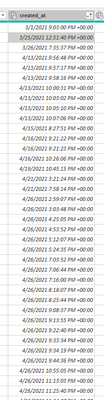
I have a column called created_at that has dates in format of ISO 8601 format YYYY-MM-DDTHH:MM:SSZ (Date/Time/TimeZone).  I want to transform that column so that every value that is before 05/15/2022 is changed TO 05/15/2022 otherwise, leave the value the same.  So the column should only have dates listed as 05/15/2022 or later.  


rsderby68_0-1666202356175.png


2 ACCEPTED SOLUTIONS
Stachu
Community Champion
Community Champion

assuming the previous step name is "#Changed Type"

= Table.TransformColumns(#"Changed Type",{{"created_at", each List.Max({_,#datetimezone(2022,5,15,0,0,0,0,0)}), type datetimezone}})

you can adjust time zone with the last 2 parameters of #datetimezone


Did I answer your question? Mark my post as a solution!
Thank you for the kudos 🙂

View solution in original post

Stachu
Community Champion
Community Champion

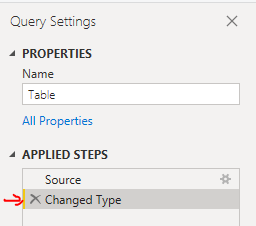
In the Transform data mode, one you enable Query Settings in the View ribbon, you will be able to see the transformation steps in each table, the code I posted assumes that the previous step is called "#Changed Type" as in the picture below

step.PNG


Did I answer your question? Mark my post as a solution!
Thank you for the kudos 🙂

View solution in original post

4 REPLIES 4
rsderby68
Resolver I
Resolver I

Forgive my blankness but would you clarify what the "previous step name is "#Changed Type"" is for?  Is "Changed Type" the original column name you mean?  


Thanks for the formula I will try it! 

Stachu
Community Champion
Community Champion

assuming the previous step name is "#Changed Type"

= Table.TransformColumns(#"Changed Type",{{"created_at", each List.Max({_,#datetimezone(2022,5,15,0,0,0,0,0)}), type datetimezone}})

you can adjust time zone with the last 2 parameters of #datetimezone


Did I answer your question? Mark my post as a solution!
Thank you for the kudos 🙂

Forgive my blankness but would you clarify what the "previous step name is "#Changed Type"" is for?  Is "Changed Type" the original column name you mean?  


Thanks for the formula I will try it! 

Stachu
Community Champion
Community Champion

In the Transform data mode, one you enable Query Settings in the View ribbon, you will be able to see the transformation steps in each table, the code I posted assumes that the previous step is called "#Changed Type" as in the picture below

step.PNG


Did I answer your question? Mark my post as a solution!
Thank you for the kudos 🙂

Helpful resources

Announcements
Power BI DataViz World Championships

Power BI Dataviz World Championships

The Power BI Data Visualization World Championships is back! Get ahead of the game and start preparing now!

November Power BI Update Carousel

Power BI Monthly Update - November 2025

Check out the November 2025 Power BI update to learn about new features.

FabCon Atlanta 2026 carousel

FabCon Atlanta 2026

Join us at FabCon Atlanta, March 16-20, for the ultimate Fabric, Power BI, AI and SQL community-led event. Save $200 with code FABCOMM.