
cancel
Showing results for 
Search instead for 
Did you mean: 

The Power BI Data Visualization World Championships is back! Get ahead of the game and start preparing now! Learn more

Reply
ironboy0418
Helper II
Helper II

How to sort start of week column in my date table?

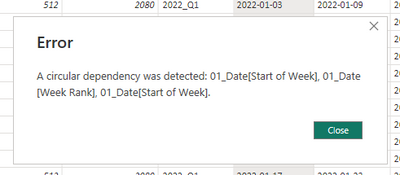
I am trying to sort start of week column using the week rank calculated column I've created. However, I am encountering this error:


ironboy0418_0-1681437489975.png


Start of week dax:

ironboy0418_4-1681437531816.png

Week Rank dax:

ironboy0418_5-1681437549479.png


1 ACCEPTED SOLUTION

hi @ironboy0418 

seems no need for the rank column, try to rewrite your column like:
Start of Week =
[Date]-WEEKDAY([Date])
 
Then you shall be able to sort by the column itself. Or?

View solution in original post

5 REPLIES 5
FreemanZ
Super User
Super User

hi @ironboy0418 

what do you mean by "sort start of week"?

Sorry. I am actually using it in my line chart, so that it will be sorted by start of week:

ironboy0418_0-1681439241583.png

Everytime I use sort by column, it gives me the above error:


ironboy0418_1-1681439273034.png


hi @ironboy0418 

seems no need for the rank column, try to rewrite your column like:
Start of Week =
[Date]-WEEKDAY([Date])
 
Then you shall be able to sort by the column itself. Or?

Thank you @FreemanZ the start of week column is actually a text data type that's why I am encountering the error. Appreciate the help!

Indeed, texts sort alphabetically. Number and Date are sorted numerically.

Helpful resources

Announcements
Power BI DataViz World Championships

Power BI Dataviz World Championships

The Power BI Data Visualization World Championships is back! Get ahead of the game and start preparing now!

December 2025 Power BI Update Carousel

Power BI Monthly Update - December 2025

Check out the December 2025 Power BI Holiday Recap!

FabCon Atlanta 2026 carousel

FabCon Atlanta 2026

Join us at FabCon Atlanta, March 16-20, for the ultimate Fabric, Power BI, AI and SQL community-led event. Save $200 with code FABCOMM.