Join us at FabCon Atlanta from March 16 - 20, 2026, for the ultimate Fabric, Power BI, AI and SQL community-led event. Save $200 with code FABCOMM.
Register now!The Power BI Data Visualization World Championships is back! Get ahead of the game and start preparing now! Learn more
Hi all,
I'm trying to achieve this with Dax but still no success,
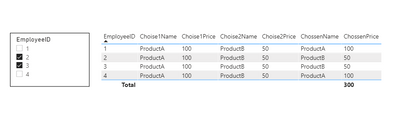
My powerBI report has a table with a list of employees,
and two additional columns of products allocated for each employee.
In each row, the user has to choose between two products for the particular employee: Product A or Product B,
and since the two products have different prices, the bottom total should change accordingly.
unfortunately, the powerBI table visual has no such feature as a row-level checkbox, so I'm looking for a workaround here.
I thought maybe to bring the employee unique list in a separate table,
then build a slicer with checkboxes over it, and write a new measure in the main table that taking ProductB instead of ProductaA whenever the employeeID checkbox is ticked.
here is the desired result, can someone lead me on how to accomplish this?
Solved! Go to Solution.
@Adidas , Not very clear to me.
Try a measure like
measure =
var _prd = allselected(product[product])
return
calculate(countrows(employee) , filter(employee, employee[product] in _prd))
or try to use treatas
https://docs.microsoft.com/en-us/dax/treatas-function
Thank you all!
@Adidas , Not very clear to me.
Try a measure like
measure =
var _prd = allselected(product[product])
return
calculate(countrows(employee) , filter(employee, employee[product] in _prd))
or try to use treatas
Thanks, @amitchandak
the measure is working great!
however, is there a way to avoid the typical behavior of a power bi slicer
that "no selection" means "all selections"?
Of course, there is. Just use the ISFILTERED function.
The Power BI Data Visualization World Championships is back! Get ahead of the game and start preparing now!
Check out the November 2025 Power BI update to learn about new features.
| User | Count |
|---|---|
| 20 | |
| 11 | |
| 10 | |
| 4 | |
| 4 |
| User | Count |
|---|---|
| 34 | |
| 32 | |
| 19 | |
| 12 | |
| 10 |