cancel
Showing results for 
Search instead for 
Did you mean: 

The Power BI Data Visualization World Championships is back! Get ahead of the game and start preparing now! Learn more

Reply
imaindia
New Member

How to make a slicer for parameter which takes on average value of columns

Hi,


I am transitioning from Tableau to Powerbi and am stuck on a problem. 

I made a parameter that takes the average values of certain columns to filter visuals.


Please have a look at the below pictures to understand better.

I want to replicate the same in Powerbi and cannot do so by making a parameter.


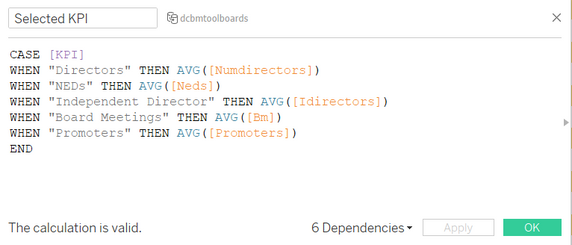
This is the KPI Parameter that I created in Tableau

imaindia_0-1691566635647.png


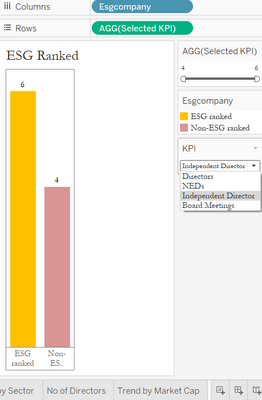
How it is applied in creating a chart in Tableau


Screenshot 2023-08-09 131134.png

The parameter in action:

imaindia_1-1691566705022.png

imaindia_2-1691566743803.png


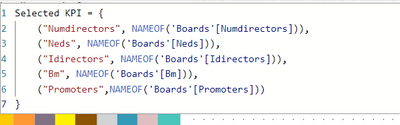
Please help with any hints and suggestions that I can use to resolve this. Currently, this is what I did to replicate:

imaindia_3-1691567031836.png

Not able to take averages here.

4 REPLIES 4
imaindia
New Member

@Mahesh0016 


Hey, thank you for your response. I did the same but I need averages of the values that are going to be put as parameter fields. I am not able to do that.

Can you help me in this aspect?

@imaindia You want to select any slicer and that slicer value passes in the parameter? if I am not wrong.

@Mahesh0016 


Let me explain a bit more clearly, apologies if I was not clear.


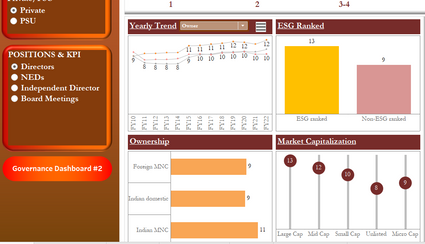
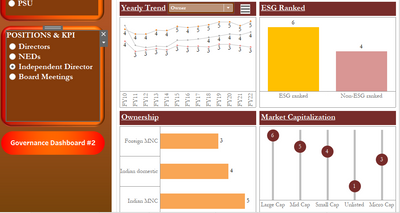
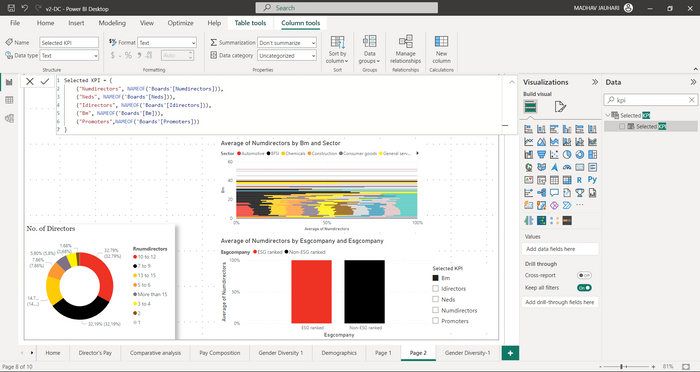
I have a dashboard with multiple visuals which are connected to this parameter. So for example


imaindia_0-1691740416348.png


In this dashboard I want these 2 visuals to be controlled with the help of the parameter selected KPI

for eg when I select numdirectors the average of numdirectors should be taken for the visuals.

similarly when promoters is selected both the visuals now show value with average of promoters.


I hope I am able to convey the query clearly now.

Mahesh0016
Super User
Super User

@imaindia  you can go with the field parameter in power bi. for more information please refer below link. Thank YOU!!!
https://youtu.be/-nqEv2YXLsU 

ELSE
Measure = 
SWITCH(

    SELECTEDVALUE(Table[Column]),
    "A",[Measure1],
    "B",[Measure2],
    Blank()
  )

Helpful resources

Announcements
Power BI DataViz World Championships

Power BI Dataviz World Championships

The Power BI Data Visualization World Championships is back! Get ahead of the game and start preparing now!

November Power BI Update Carousel

Power BI Monthly Update - November 2025

Check out the November 2025 Power BI update to learn about new features.

FabCon Atlanta 2026 carousel

FabCon Atlanta 2026

Join us at FabCon Atlanta, March 16-20, for the ultimate Fabric, Power BI, AI and SQL community-led event. Save $200 with code FABCOMM.