
cancel
Showing results for 
Search instead for 
Did you mean: 

The Power BI Data Visualization World Championships is back! Get ahead of the game and start preparing now! Learn more

Reply
Anonymous
Not applicable

How to keep only the domain name with DAX

Hi Community!

I am struggling with an issue that seems to be very straight forward. 
I want to only keep the domain of an e-mail address. As I do not have access to the source, I need it to be a dax measure.

This is what I want to achieve:
John.Doe@powerbi.com -> powerbi
JaneDoe@computer.com -> computer
Please note that some e-mail addresses have following format (in case it might be relevant):
John.Doe@us.powerbi.com -> us.powerbi


Thank you in advance!

1 ACCEPTED SOLUTION
Anonymous
Not applicable

Hi @Anonymous ,

You can create a measure as below to get it:

Domain name = 
VAR _selemail =
    SELECTEDVALUE ( 'Table'[e-mail addresses] )
VAR _aposition =
    SEARCH ( "@", _selemail, 1, 0 )
VAR _composition =
    SEARCH ( ".com", _selemail, 1, 0 )
RETURN
    MID ( _selemail, _aposition + 1, _composition - _aposition - 1 )

yingyinr_0-1665654084265.png

Best Regards

View solution in original post

4 REPLIES 4
amitchandak
Super User
Super User

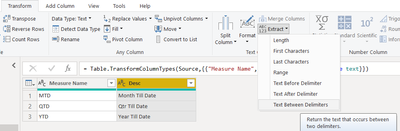
@Anonymous , Power query text between delimiter @ and .

amitchandak_0-1665419149455.png


Share with Power BI Enthusiasts: Full Power BI Video (20 Hours) YouTube
Microsoft Fabric Series 60+ Videos YouTube
Microsoft Fabric Hindi End to End YouTube
Anonymous
Not applicable

Hi Amitchandak!
Thank you for your reply - I've tried this but unfortunately it does not work as I get this message:

Rocketcity45_1-1665419983106.png


Therefore, I was thinking of a dax measure...

Anonymous
Not applicable

Hi @Anonymous ,

You can create a measure as below to get it:

Domain name = 
VAR _selemail =
    SELECTEDVALUE ( 'Table'[e-mail addresses] )
VAR _aposition =
    SEARCH ( "@", _selemail, 1, 0 )
VAR _composition =
    SEARCH ( ".com", _selemail, 1, 0 )
RETURN
    MID ( _selemail, _aposition + 1, _composition - _aposition - 1 )

yingyinr_0-1665654084265.png

Best Regards

Anonymous
Not applicable

Thank you! This worked. 🙂

Helpful resources

Announcements
November Power BI Update Carousel

Power BI Monthly Update - November 2025

Check out the November 2025 Power BI update to learn about new features.

Fabric Data Days Carousel

Fabric Data Days

Advance your Data & AI career with 50 days of live learning, contests, hands-on challenges, study groups & certifications and more!

FabCon Atlanta 2026 carousel

FabCon Atlanta 2026

Join us at FabCon Atlanta, March 16-20, for the ultimate Fabric, Power BI, AI and SQL community-led event. Save $200 with code FABCOMM.