cancel
Showing results for 
Search instead for 
Did you mean: 

The Power BI Data Visualization World Championships is back! Get ahead of the game and start preparing now! Learn more

Reply
Anonymous
Not applicable

How to group/combine row definition into a specific category

Hello Experts,


I need to group/combine row variables into a specific category type. For example;


I have a column called industry category where I have row variables captured as "Supermarket/Supermarkets/SuperMkts" for three different businesses. But they are part of the same industry type. I would like to group them as "Supermarkets" so that I can visualise my data in the correct format. Now I can group them by right-clicking on the column and select "New Group". It's a cumbersome task when I need to do a similar exercise for 20k line items. I was wondering if there is a way to automate this process by writing a dax code or in power query! 


I am unable to find a solution. It would be great if you could help me with this.


Thanks in advance


Regards

ronie

1 ACCEPTED SOLUTION

Hi @Anonymous 

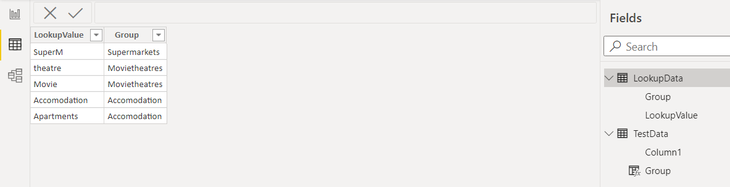
Bestway is create lookup table like below  and create calculated column

In future if you want to add new values, you can simply update this lookup table.

gvrajesh_0-1614941722112.png

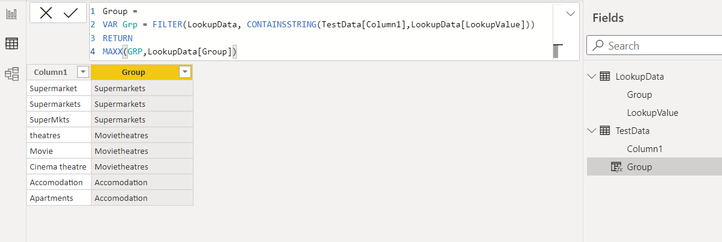
Create calculate column

gvrajesh_1-1614941800261.png


View solution in original post

3 REPLIES 3
gvrajesh
Frequent Visitor

Hi @Anonymous 

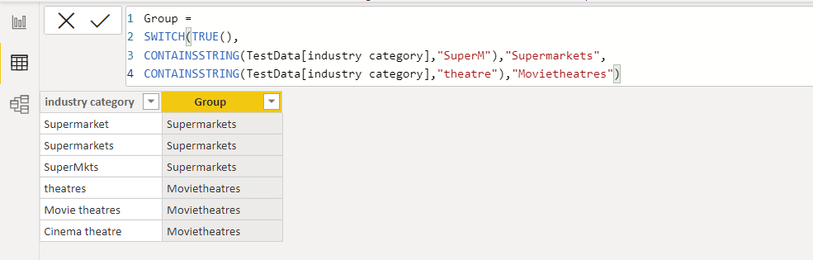
You can create a calcualted column like below

gvrajesh_0-1614912506099.png


Anonymous
Not applicable

Hello @gvrajesh,


Thank you for your reply. I can certainly apply your logic to search a specific keyword. Unfortunately, I have plenty to look for. Can I add multiple search rules in single containsstring function? I was thinking of this way; 

CONTAINSSTRING('table name1'[column1],"Accomodation") || CONTAINSSTRING('table name1'[column1],"Apartments"), "Accomodation")
 
I need to add few more keywords. Is there a better way to implement it?
 
Thanks
 

Hi @Anonymous 

Bestway is create lookup table like below  and create calculated column

In future if you want to add new values, you can simply update this lookup table.

gvrajesh_0-1614941722112.png

Create calculate column

gvrajesh_1-1614941800261.png


Helpful resources

Announcements
Power BI DataViz World Championships

Power BI Dataviz World Championships

The Power BI Data Visualization World Championships is back! Get ahead of the game and start preparing now!

November Power BI Update Carousel

Power BI Monthly Update - November 2025

Check out the November 2025 Power BI update to learn about new features.

FabCon Atlanta 2026 carousel

FabCon Atlanta 2026

Join us at FabCon Atlanta, March 16-20, for the ultimate Fabric, Power BI, AI and SQL community-led event. Save $200 with code FABCOMM.