Fabric Data Days starts November 4th!
Advance your Data & AI career with 50 days of live learning, dataviz contests, hands-on challenges, study groups & certifications and more!
Get registered- Power BI forums
- Get Help with Power BI
- Desktop
- Service
- Report Server
- Power Query
- Mobile Apps
- Developer
- DAX Commands and Tips
- Custom Visuals Development Discussion
- Health and Life Sciences
- Power BI Spanish forums
- Translated Spanish Desktop
- Training and Consulting
- Instructor Led Training
- Dashboard in a Day for Women, by Women
- Galleries
- Data Stories Gallery
- Themes Gallery
- Contests Gallery
- QuickViz Gallery
- Quick Measures Gallery
- Visual Calculations Gallery
- Notebook Gallery
- Translytical Task Flow Gallery
- TMDL Gallery
- R Script Showcase
- Webinars and Video Gallery
- Ideas
- Custom Visuals Ideas (read-only)
- Issues
- Issues
- Events
- Upcoming Events
Get Fabric Certified for FREE during Fabric Data Days. Don't miss your chance! Request now
- Power BI forums
- Forums
- Get Help with Power BI
- DAX Commands and Tips
- Re: How to give a value to different rows when con...
- Subscribe to RSS Feed
- Mark Topic as New
- Mark Topic as Read
- Float this Topic for Current User
- Bookmark
- Subscribe
- Printer Friendly Page

- Mark as New
- Bookmark
- Subscribe
- Mute
- Subscribe to RSS Feed
- Permalink
- Report Inappropriate Content
How to give a value to different rows when condition applies on one only
Hi everyone!
I'm facing a problem that I believe should be easy to solve but I don't know which DAX formula to use, the data I have is the following:
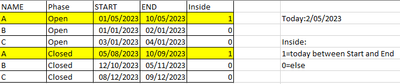
What I need to do is to create a column called "inside" that will have a 1 if the today date (2/5/2023 in the example above) is between the Start and End dates for the Phase "open". The problem is that I need to apply that same value for different rows that have the same Name, so the second time "A" appears on the table should also have a 1 on the "Inside" column. Should it be done with Calculate or a Filter?
And then I also need to get the Name of the nearest End date for those projects that have a 1 on Inside, so if for example there would be more projects with a 1, I would need to know which one is more near to the today's date.
Thank you so much in advance for your help.
Solved! Go to Solution.

- Mark as New
- Bookmark
- Subscribe
- Mute
- Subscribe to RSS Feed
- Permalink
- Report Inappropriate Content
Hi @hasier ,
I created 4 measures to get your expected outputs. Please try:
Flag =
var _today= DATE(2023,5,2)
return IF(_today>=MAX('Table'[START]) && _today<=MAX('Table'[END]) && MAX('Table'[Phase])="Open",1,0)
Inside =
var _flag=SUMX(FILTER(ALL('Table'),[NAME]=MAX('Table'[NAME])),[Flag])
return IF(_flag>=1,1,0)Diff =
var _today= DATE(2023,5,2)
var _end=CALCULATE(MAX('Table'[END]),FILTER('Table',[Flag]=1))
return IF(_end=BLANK(),BLANK(), ABS( DATEDIFF(MAX('Table'[END]),_today,DAY)))Name of Nearest End Date =
CALCULATE(MAX('Table'[NAME]),FILTER('Table',[Diff]=MINX(ALL('Table'),[Diff])))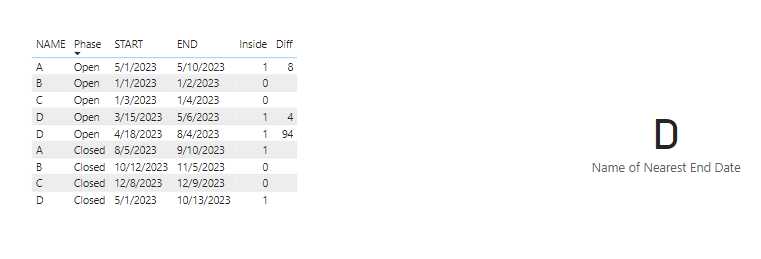
Best Regards,
Eyelyn Qin
If this post helps, then please consider Accept it as the solution to help the other members find it more quickly.
- Mark as New
- Bookmark
- Subscribe
- Mute
- Subscribe to RSS Feed
- Permalink
- Report Inappropriate Content
Hi @hasier ,
I created 4 measures to get your expected outputs. Please try:
Flag =
var _today= DATE(2023,5,2)
return IF(_today>=MAX('Table'[START]) && _today<=MAX('Table'[END]) && MAX('Table'[Phase])="Open",1,0)
Inside =
var _flag=SUMX(FILTER(ALL('Table'),[NAME]=MAX('Table'[NAME])),[Flag])
return IF(_flag>=1,1,0)Diff =
var _today= DATE(2023,5,2)
var _end=CALCULATE(MAX('Table'[END]),FILTER('Table',[Flag]=1))
return IF(_end=BLANK(),BLANK(), ABS( DATEDIFF(MAX('Table'[END]),_today,DAY)))Name of Nearest End Date =
CALCULATE(MAX('Table'[NAME]),FILTER('Table',[Diff]=MINX(ALL('Table'),[Diff])))
Best Regards,
Eyelyn Qin
If this post helps, then please consider Accept it as the solution to help the other members find it more quickly.


- Mark as New
- Bookmark
- Subscribe
- Mute
- Subscribe to RSS Feed
- Permalink
- Report Inappropriate Content
You will need one more extra column for this. I think you might be able to achieve this with FILTER() =MIN() , check out this post on Microsoft Learn https://learn.microsoft.com/en-us/dax/best-practices/dax-avoid-avoid-filter-as-filter-argument
- Mark as New
- Bookmark
- Subscribe
- Mute
- Subscribe to RSS Feed
- Permalink
- Report Inappropriate Content
That's what I'm not able to do, I have tried both functions and multiple columns but I don't get the result I need 😞
- Mark as New
- Bookmark
- Subscribe
- Mute
- Subscribe to RSS Feed
- Permalink
- Report Inappropriate Content
So you want to relate the 1 or 0 to the Name? How do you differnetiate the rows with the same Name?
- Mark as New
- Bookmark
- Subscribe
- Mute
- Subscribe to RSS Feed
- Permalink
- Report Inappropriate Content
Exactly, I want to choose the 1 or 0 based on the column Phase. When the value on that column is "Open" I check if the today's date is between the Start and End. If it is, I want to put a 1 not only on that row but on all the rows that have that same name, that's what I'm not able to do 😞
- Mark as New
- Bookmark
- Subscribe
- Mute
- Subscribe to RSS Feed
- Permalink
- Report Inappropriate Content
hi @hasier I would create the if clause on a calculated column in the data model. In this way you will have a 1 or a 0 per row. (1)
Then I would create a measure or a calculated column (you will have to see what suits you best) with MAX date to get the latest date.
I hope this helps.
- Mark as New
- Bookmark
- Subscribe
- Mute
- Subscribe to RSS Feed
- Permalink
- Report Inappropriate Content
Hi @IIPowerBlog, thank you for your answer!
I have tried that but I'm only able to get a 1 on the row that has the date, and not on the other row that "A" appears. I need to have the value on both to be able to filter it later.
Helpful resources

Fabric Data Days
Advance your Data & AI career with 50 days of live learning, contests, hands-on challenges, study groups & certifications and more!

Power BI Monthly Update - October 2025
Check out the October 2025 Power BI update to learn about new features.

FabCon Atlanta 2026
Join us at FabCon Atlanta, March 16-20, for the ultimate Fabric, Power BI, AI and SQL community-led event. Save $200 with code FABCOMM.

| User | Count |
|---|---|
| 8 | |
| 8 | |
| 6 | |
| 5 | |
| 4 |


| User | Count |
|---|---|
| 25 | |
| 11 | |
| 10 | |
| 8 | |
| 8 |


