Join us at FabCon Atlanta from March 16 - 20, 2026, for the ultimate Fabric, Power BI, AI and SQL community-led event. Save $200 with code FABCOMM.
Register now!The Power BI Data Visualization World Championships is back! Get ahead of the game and start preparing now! Learn more
Hi,
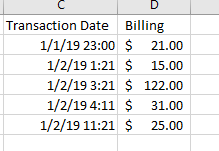
So here I am elaborating my issue with one example.
My requirement is to add all the billing amount in between 01/01/2019 4:00 am to 02/01/2019 4:00 am using DAX.
The result should be $158 .
[Total Billing] =
var __start = DT1 -- DT1 and DT2 are dates taken from somewhere, possibly a slicer
var __end = DT2
var __result =
calculate(
sum( T[Billing] ),
T[Transaction Date] >= DT1,
T[Transaction Date] <= DT2,
ALL( T[Transaction Date] )
)
return
__result
I'll tell you right away: your model is sub-optimal. If the table you've shown is the fact table and you don't have any dimensions in a one:many relationship with the table, especially Date table and Time table, then you'll very soon be faced with DAX that will not be fast and no amount of fiddling with it will make it so. I'd really suggest you learn about the proper model design before you start building the whole thing WRONGLY. If after having built 80% of the model you'll find that you've done it incorrectly, think about the amount of work that will go into starting almost all over again...
You've been warned.
Best
Darek
Check out the November 2025 Power BI update to learn about new features.
Advance your Data & AI career with 50 days of live learning, contests, hands-on challenges, study groups & certifications and more!
| User | Count |
|---|---|
| 21 | |
| 10 | |
| 9 | |
| 4 | |
| 4 |
| User | Count |
|---|---|
| 34 | |
| 31 | |
| 19 | |
| 12 | |
| 10 |