cancel
Showing results for 
Search instead for 
Did you mean: 

The Power BI Data Visualization World Championships is back! Get ahead of the game and start preparing now! Learn more

Reply
PbiCeo
Helper II
Helper II

How to get data from existing value on a new column according conditions

Hello everyone,


I've got a table like this:

Loc     Date                Type           Val        Price

TK2020/7/14Amount1,0001000
TK2020/7/14PT580
KT2020/7/14Amount900900
KT2020/7/14PT500


If Loc and Date are same, I want to get Val where Type is PT as the first value.

And for the second, I want to get Price where Type is PT.

The expected values as follows:

PT

58
0
50
0


How can I do that?

Thanks,

Vladi

3 REPLIES 3
harshnathani
Community Champion
Community Champion

HI @PbiCeo ,


Not very clear from what you have explained. 


Can you try explaining it a little better.


Where did you get 80 from ?


Regards,

Harsh Nathani

Sorry, it was just a mistake, not 80, but 50.

Hi @PbiCeo ,


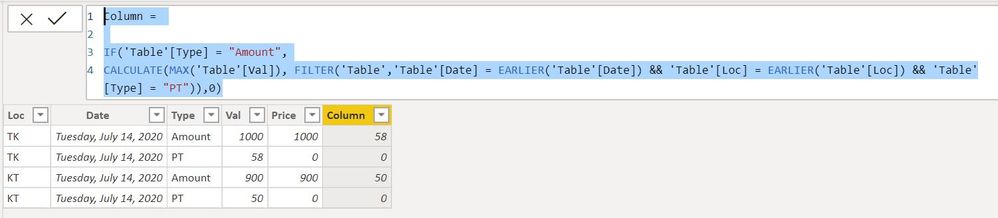
You can create a Column


Column = 

IF('Table'[Type] = "Amount",
CALCULATE(MAX('Table'[Val]), FILTER('Table','Table'[Date] = EARLIER('Table'[Date]) && 'Table'[Loc] = EARLIER('Table'[Loc]) && 'Table'[Type] = "PT")),0)


1.jpg


Regards,

Harsh Nathani


Appreciate with a Kudos!! (Click the Thumbs Up Button)

Did I answer your question? Mark my post as a solution!

Helpful resources

Announcements
Power BI DataViz World Championships

Power BI Dataviz World Championships

The Power BI Data Visualization World Championships is back! Get ahead of the game and start preparing now!

November Power BI Update Carousel

Power BI Monthly Update - November 2025

Check out the November 2025 Power BI update to learn about new features.

FabCon Atlanta 2026 carousel

FabCon Atlanta 2026

Join us at FabCon Atlanta, March 16-20, for the ultimate Fabric, Power BI, AI and SQL community-led event. Save $200 with code FABCOMM.