cancel
Showing results for 
Search instead for 
Did you mean: 

The Power BI Data Visualization World Championships is back! Get ahead of the game and start preparing now! Learn more

Reply
Anonymous
Not applicable

How to find the top level parent in DAX?

I have a list of rooms in facilities, eg:

FacilityIDFacility NamepartOf
1Health Centre0
2Office1
3Xray Department1
4XRay Room 13
5XRay Room 23
6Pharmacy0


Facilities without a parent will have the parent ID of 0. I need to find the top level parent of each facility using DAX and save it as a seperate column called ParentFacility, to yield a calculated column as follows;

FacilityIDFacility NamepartOfParent
1Health Centre01
2Office11
3Xray Department11
4XRay Room 131
5XRay Room 231
6Pharmacy06


Thanks in advance. I can only figure out how to do this with nested if statements but there's no max level, so any help would be hugely appreciated.


Thank you!

1 ACCEPTED SOLUTION
OwenAuger
Super User
Super User

@Anonymous 

You can make use of DAX PATH functions for this.

You will need to adjust the partOf column to convert zero values to blanks however.


1. Create a calculated column partOf Adjusted that converts zero to blank:


partOf Adjusted = 
IF ( Facility[partOf] <> 0, Facility[partOf] )


2. Created the calculated column Parent:


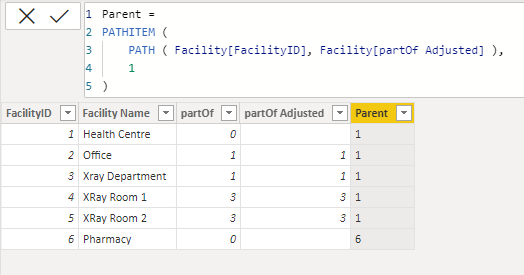
Parent = 
PATHITEM (
    PATH ( Facility[FacilityID], Facility[partOf Adjusted] ),
    1
)


The PATH function recursively constructs the path from topmost parent to a given node, and PATHITEM is used to extract an item in a particular position, in this case position 1.

OwenAuger_0-1652865225737.png


Regards,

Owen


Owen Auger
Did I answer your question? Mark my post as a solution!
Blog
LinkedIn

View solution in original post

2 REPLIES 2
Anonymous
Not applicable

That works perfectly and I learned something about heirarchies. Thank you so much!

OwenAuger
Super User
Super User

@Anonymous 

You can make use of DAX PATH functions for this.

You will need to adjust the partOf column to convert zero values to blanks however.


1. Create a calculated column partOf Adjusted that converts zero to blank:


partOf Adjusted = 
IF ( Facility[partOf] <> 0, Facility[partOf] )


2. Created the calculated column Parent:


Parent = 
PATHITEM (
    PATH ( Facility[FacilityID], Facility[partOf Adjusted] ),
    1
)


The PATH function recursively constructs the path from topmost parent to a given node, and PATHITEM is used to extract an item in a particular position, in this case position 1.

OwenAuger_0-1652865225737.png


Regards,

Owen


Owen Auger
Did I answer your question? Mark my post as a solution!
Blog
LinkedIn

Helpful resources

Announcements
November Power BI Update Carousel

Power BI Monthly Update - November 2025

Check out the November 2025 Power BI update to learn about new features.

Fabric Data Days Carousel

Fabric Data Days

Advance your Data & AI career with 50 days of live learning, contests, hands-on challenges, study groups & certifications and more!

FabCon Atlanta 2026 carousel

FabCon Atlanta 2026

Join us at FabCon Atlanta, March 16-20, for the ultimate Fabric, Power BI, AI and SQL community-led event. Save $200 with code FABCOMM.