FabCon is coming to Atlanta
Join us at FabCon Atlanta from March 16 - 20, 2026, for the ultimate Fabric, Power BI, AI and SQL community-led event. Save $200 with code FABCOMM.
Register now!- Power BI forums
- Get Help with Power BI
- Desktop
- Service
- Report Server
- Power Query
- Mobile Apps
- Developer
- DAX Commands and Tips
- Custom Visuals Development Discussion
- Health and Life Sciences
- Power BI Spanish forums
- Translated Spanish Desktop
- Training and Consulting
- Instructor Led Training
- Dashboard in a Day for Women, by Women
- Galleries
- Data Stories Gallery
- Themes Gallery
- Contests Gallery
- QuickViz Gallery
- Quick Measures Gallery
- Visual Calculations Gallery
- Notebook Gallery
- Translytical Task Flow Gallery
- TMDL Gallery
- R Script Showcase
- Webinars and Video Gallery
- Ideas
- Custom Visuals Ideas (read-only)
- Issues
- Issues
- Events
- Upcoming Events
Get Fabric Certified for FREE during Fabric Data Days. Don't miss your chance! Request now
- Power BI forums
- Forums
- Get Help with Power BI
- DAX Commands and Tips
- Re: How to disaggregate a total amount into lower ...
- Subscribe to RSS Feed
- Mark Topic as New
- Mark Topic as Read
- Float this Topic for Current User
- Bookmark
- Subscribe
- Printer Friendly Page

- Mark as New
- Bookmark
- Subscribe
- Mute
- Subscribe to RSS Feed
- Permalink
- Report Inappropriate Content
How to disaggregate a total amount into lower levels
Hey all,
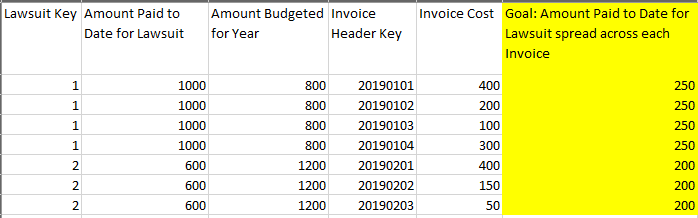
Having trouble figuring out the DAX here. Want to create a calculated column that will disaggregate the paid to date for a lawsuit by the separate invoices. For Example: $1000 has been paid out for Lawsuit Key Value 1. There are 4 invoices for that lawsuit, thus in column 5 the value needs to be 250 for Lawsuit Value 1. What is the DAX formula here? Thanks all! Pic below.
Solved! Go to Solution.


- Mark as New
- Bookmark
- Subscribe
- Mute
- Subscribe to RSS Feed
- Permalink
- Report Inappropriate Content
@Anonymous
Hi,
Goal =
[Amount paid to date for law suit]
    / CALCULATE (
        COUNTROWS ( TableName ),
        ALLEXCEPT ( TableName, TableName[Lawsuitkey] )
    )
Regards
Zubair
Please try my custom visuals
- Mark as New
- Bookmark
- Subscribe
- Mute
- Subscribe to RSS Feed
- Permalink
- Report Inappropriate Content
Here's the formula for your column:
Percent Change =
var __actual = TableName[Actual Paid to Date Spread]
var __budgeted = TableName[Budgeted for Lawsuit]
var __percentChangeFromBudgeted =
    DIVIDE(
        __actual - __budgeted,
        __budgeted
    )
return
    __percentChangeFromBudgeted
Please always precede the name of a column with the name of the table it belongs to and never precede the name of a measure with the name of the table it belongs to.
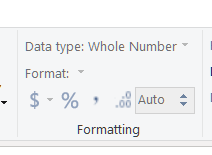
Second, the formula does not multiply by 100 because this is not how it should work. It returns a number and you have to format it as percentage using the formatting group in the ribbon:
Hope this helps.
Best
Darek
- Mark as New
- Bookmark
- Subscribe
- Mute
- Subscribe to RSS Feed
- Permalink
- Report Inappropriate Content
@Anonymous
Hi,
Goal =
[Amount paid to date for law suit]
    / CALCULATE (
        COUNTROWS ( TableName ),
        ALLEXCEPT ( TableName, TableName[Lawsuitkey] )
    )
Regards
Zubair
Please try my custom visuals
- Mark as New
- Bookmark
- Subscribe
- Mute
- Subscribe to RSS Feed
- Permalink
- Report Inappropriate Content
Hey @Zubair_Muhammad One more question. What then would be the DAX formula to calculate the percent change between the amount paid and the amount budgeted. The formula is in the picture I've attached. You've been a tremendous help!
Best.

- Mark as New
- Bookmark
- Subscribe
- Mute
- Subscribe to RSS Feed
- Permalink
- Report Inappropriate Content
Here's the formula for your column:
Percent Change =
var __actual = TableName[Actual Paid to Date Spread]
var __budgeted = TableName[Budgeted for Lawsuit]
var __percentChangeFromBudgeted =
    DIVIDE(
        __actual - __budgeted,
        __budgeted
    )
return
    __percentChangeFromBudgeted
Please always precede the name of a column with the name of the table it belongs to and never precede the name of a measure with the name of the table it belongs to.
Second, the formula does not multiply by 100 because this is not how it should work. It returns a number and you have to format it as percentage using the formatting group in the ribbon:
Hope this helps.
Best
Darek
- Mark as New
- Bookmark
- Subscribe
- Mute
- Subscribe to RSS Feed
- Permalink
- Report Inappropriate Content
How can I calculate then instead of just disaggregating the budget amount evenly across invoices, how can I calculate the percent the invoice is to the total net amount for invoices charged to that specific lawsuit and then divide the budget based upon that percent?
- Mark as New
- Bookmark
- Subscribe
- Mute
- Subscribe to RSS Feed
- Permalink
- Report Inappropriate Content
- Mark as New
- Bookmark
- Subscribe
- Mute
- Subscribe to RSS Feed
- Permalink
- Report Inappropriate Content
Helpful resources

Power BI Monthly Update - November 2025
Check out the November 2025 Power BI update to learn about new features.

Fabric Data Days
Advance your Data & AI career with 50 days of live learning, contests, hands-on challenges, study groups & certifications and more!

FabCon Atlanta 2026
Join us at FabCon Atlanta, March 16-20, for the ultimate Fabric, Power BI, AI and SQL community-led event. Save $200 with code FABCOMM.

| User | Count |
|---|---|
| 9 | |
| 9 | |
| 8 | |
| 6 | |
| 5 |


| User | Count |
|---|---|
| 23 | |
| 16 | |
| 15 | |
| 14 | |
| 8 |


