Join us at FabCon Atlanta from March 16 - 20, 2026, for the ultimate Fabric, Power BI, AI and SQL community-led event. Save $200 with code FABCOMM.
Register now!The Power BI Data Visualization World Championships is back! Get ahead of the game and start preparing now! Learn more
Hi,
I am started to use PowerBI recently and I have a question.
Is it possible and how created a calculate column to do:
Using the items selected in slicer 1 and slicer 2, created a column which has the value of column "Mensual M" multiply by any factor from month of slicer 1 meanwhile values in previously month no change.
for the picture I would like created a column which from january and february has the value of column "Mensual M" but March "Mensual M" * any factor.
Regards
@GustavoV1 - Couple things. You can't do this with a calculated column, you will have to use a measure. Calculated columns are only calculated when data is refreshed so they cannot be dynamic. The other thing is that I am not understanding what you are trying to achieve exactly.
Not really enough information to go on, please first check if your issue is a common issue listed here: https://community.powerbi.com/t5/Community-Blog/Before-You-Post-Read-This/ba-p/1116882
Also, please see this post regarding How to Get Your Question Answered Quickly: https://community.powerbi.com/t5/Community-Blog/How-to-Get-Your-Question-Answered-Quickly/ba-p/38490
The most important parts are:
1. Sample data as text, use the table tool in the editing bar
2. Expected output from sample data
3. Explanation in words of how to get from 1. to 2.
I follow your advice and put som information.
I have:
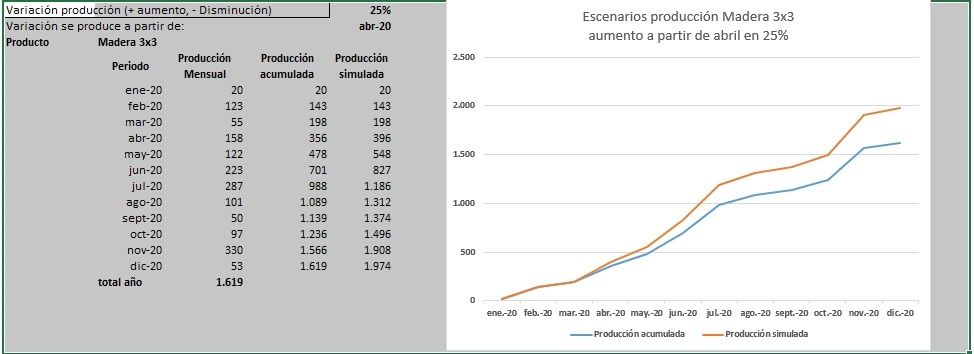
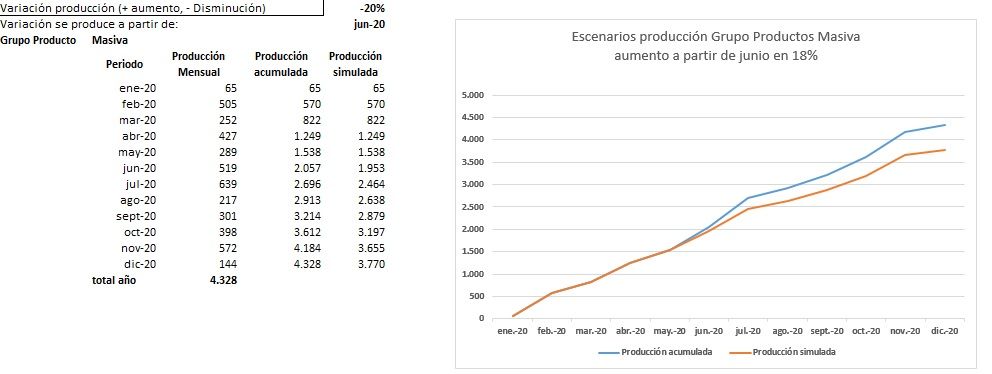
What we expected
also put some outcomes expected
Regards
Table "Grupo Materiales"
| idGrupo | Grupo |
| 1 | Masiva |
| 2 | Intermedia |
| 3 | Puntual |
| 4 | En Desarrollo |
Table "Plan Producción"
| Producto | nombre | medida | Grupo | Tipo | ene-20 | feb-20 | mar-20 | abr-20 | may-20 | jun-20 | jul-20 | ago-20 | sept-20 | oct-20 | nov-20 | dic-20 | total 2020 |
| HAX-23 | Madera 3x3 | unidad | Masiva | Nuevo | 20 | 123 | 55 | 158 | 122 | 223 | 287 | 101 | 50 | 97 | 330 | 53 | 1.619 |
| HAZ-22 | Madera 1x3 | unidad | Masiva | Existente | 45 | 382 | 197 | 269 | 167 | 296 | 352 | 116 | 251 | 301 | 242 | 91 | 2.709 |
| HAX-31 | Madera 2x4 | unidad | Intermedia | Nuevo | 284 | 315 | 357 | 36 | 193 | 318 | 286 | 108 | 170 | 198 | 47 | 299 | 2.611 |
| HAX-22 | Madera 3x4 | unidad | En Desarrollo | Nuevo | 213 | 294 | 373 | 115 | 78 | 161 | 105 | 185 | 194 | 247 | 22 | 259 | 2.246 |
| HAX-32 | Madera 4x4 | unidad | Puntual | Existente | 99 | 78 | 357 | 387 | 302 | 27 | 170 | 51 | 162 | 150 | 20 | 247 | 2.050 |
| HAX-44 | Madera 2x2 | unidad | Intermedia | Existente | 274 | 41 | 104 | 61 | 192 | 104 | 88 | 39 | 47 | 339 | 364 | 101 | 1.754 |
| HAX-54 | Madera 2x6 | unidad | En Desarrollo | Nuevo | 325 | 227 | 259 | 264 | 388 | 37 | 158 | 263 | 195 | 323 | 156 | 230 | 2.825 |
| HAX-65 | Madera 4x5 | unidad | Puntual | Nuevo | 54 | 109 | 28 | 119 | 257 | 47 | 302 | 396 | 380 | 73 | 193 | 399 | 2.357 |
Visualization expected:
The Power BI Data Visualization World Championships is back! Get ahead of the game and start preparing now!
Check out the November 2025 Power BI update to learn about new features.
| User | Count |
|---|---|
| 20 | |
| 11 | |
| 10 | |
| 4 | |
| 4 |
| User | Count |
|---|---|
| 33 | |
| 30 | |
| 19 | |
| 12 | |
| 11 |