FabCon is coming to Atlanta
Join us at FabCon Atlanta from March 16 - 20, 2026, for the ultimate Fabric, Power BI, AI and SQL community-led event. Save $200 with code FABCOMM.
Register now!- Power BI forums
- Get Help with Power BI
- Desktop
- Service
- Report Server
- Power Query
- Mobile Apps
- Developer
- DAX Commands and Tips
- Custom Visuals Development Discussion
- Health and Life Sciences
- Power BI Spanish forums
- Translated Spanish Desktop
- Training and Consulting
- Instructor Led Training
- Dashboard in a Day for Women, by Women
- Galleries
- Data Stories Gallery
- Themes Gallery
- Contests Gallery
- Quick Measures Gallery
- Notebook Gallery
- Translytical Task Flow Gallery
- TMDL Gallery
- R Script Showcase
- Webinars and Video Gallery
- Ideas
- Custom Visuals Ideas (read-only)
- Issues
- Issues
- Events
- Upcoming Events
To celebrate FabCon Vienna, we are offering 50% off select exams. Ends October 3rd. Request your discount now.
- Power BI forums
- Forums
- Get Help with Power BI
- DAX Commands and Tips
- Re: How to create measure for Volume (in 1 000 KGS...
- Subscribe to RSS Feed
- Mark Topic as New
- Mark Topic as Read
- Float this Topic for Current User
- Bookmark
- Subscribe
- Printer Friendly Page

- Mark as New
- Bookmark
- Subscribe
- Mute
- Subscribe to RSS Feed
- Permalink
- Report Inappropriate Content
How to create measure for Volume (in 1 000 KGS) of 1 SKU/Volume (in 1 000 KGS) of all SKU?
Hi, I know it must be simpler but I am literally stuck in this.I have the data like this
| Month | Volume in 1000Kgs |
| jan | 100 |
| feb | 200 |
| mar | 300 |
I want the result to be shown as,100/600 for jan,200/600 for feb,300/600 for mar.Please get me the solution for this
Solved! Go to Solution.
- Mark as New
- Bookmark
- Subscribe
- Mute
- Subscribe to RSS Feed
- Permalink
- Report Inappropriate Content
All selected (item) worked as comparison to this, this is showing me the exact values in col B


- Mark as New
- Bookmark
- Subscribe
- Mute
- Subscribe to RSS Feed
- Permalink
- Report Inappropriate Content
Hi, @Parul_verma
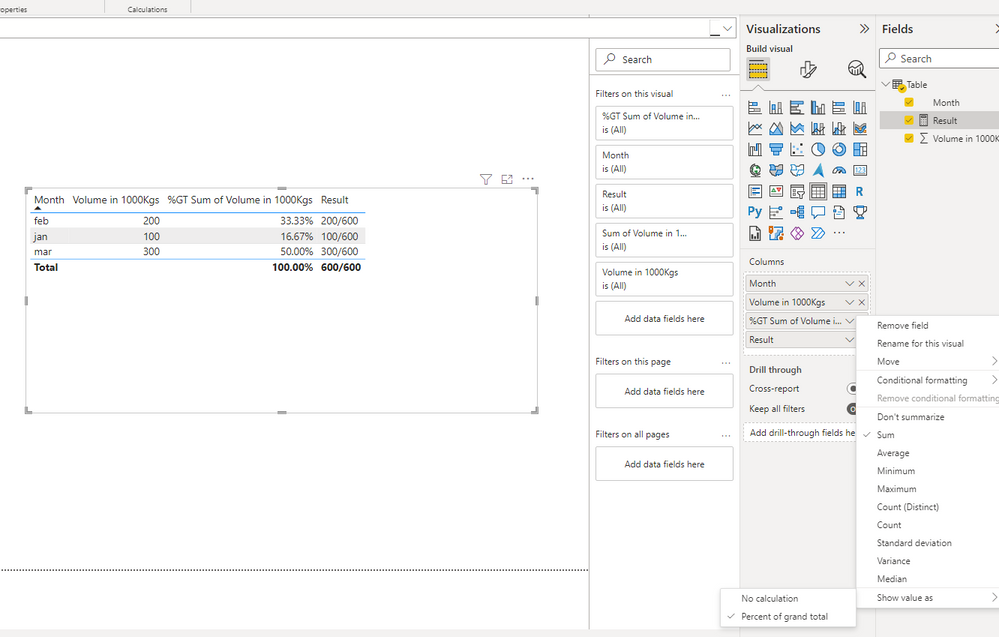
If you just want to display as 100/600 in January, 200/600 in February, and 300/600 in March, then what you might want to create is a Text measure like the following:
Result =
VAR a =
    SUM ( 'Table'[Volume in 1000Kgs] )
VAR b =
    CALCULATE ( SUM ( 'Table'[Volume in 1000Kgs] ), ALL ( 'Table' ) )
RETURN
    a & "/" & b
If you want the result to be a calculated value, you can also consider checking 'show value as percent of grand total' to display the result.
Best Regards,
Community Support Team _ Eason
- Mark as New
- Bookmark
- Subscribe
- Mute
- Subscribe to RSS Feed
- Permalink
- Report Inappropriate Content
All selected (item) worked as comparison to this, this is showing me the exact values in col B


- Mark as New
- Bookmark
- Subscribe
- Mute
- Subscribe to RSS Feed
- Permalink
- Report Inappropriate Content
- Mark as New
- Bookmark
- Subscribe
- Mute
- Subscribe to RSS Feed
- Permalink
- Report Inappropriate Content
not working I am unable to take volume column without any function under calculate
- Mark as New
- Bookmark
- Subscribe
- Mute
- Subscribe to RSS Feed
- Permalink
- Report Inappropriate Content
Hi @Parul_verma
I thought it was a measure. Please try
=
DIVIDE ( SUM ( [Volume] ), CALCULATE ( SUM ( [Volumne] ), ALL ( 'Table'[Month] ) ) )

- Mark as New
- Bookmark
- Subscribe
- Mute
- Subscribe to RSS Feed
- Permalink
- Report Inappropriate Content
Hi,
"shown" where? In a measure or in a calculated column?
- Mark as New
- Bookmark
- Subscribe
- Mute
- Subscribe to RSS Feed
- Permalink
- Report Inappropriate Content
In a measure

Helpful resources

Power BI Monthly Update - September 2025
Check out the September 2025 Power BI update to learn about new features.

Fabric Community Update - August 2025
Find out what's new and trending in the Fabric community.

| User | Count |
|---|---|
| 13 | |
| 10 | |
| 6 | |
| 5 | |
| 4 |


