Join us at FabCon Atlanta from March 16 - 20, 2026, for the ultimate Fabric, Power BI, AI and SQL community-led event. Save $200 with code FABCOMM.
Register now!The Power BI Data Visualization World Championships is back! Get ahead of the game and start preparing now! Learn more
Hi all,
Need a dynamic DAX that can count the no. of items within a category. Following is a sample data:
| Level 1 | Level 2 |
| A | a1 |
| A | a2 |
| B | b1 |
| B | b2 |
| A | a3 |
| A | a4 |
| C | c1 |
| C | c2 |
| C | c3 |
Result should be something like this:
| Level 1 | Count |
| A | 4 |
| B | 2 |
| C | 3 |
Please don't assume that A,B,C are the only Level 1s, as it might change as new data comes in.
The same DAX should work for following change as well (Let's say a 4th Level 1 comes in)
| Level 1 | Level 2 |
| A | a1 |
| A | a2 |
| B | b1 |
| B | b2 |
| A | a3 |
| A | a4 |
| C | c1 |
| C | c2 |
| D | d1 |
| C | c3 |
The result should then be:
| Level 1 | Count |
| A | 4 |
| B | 2 |
| C | 3 |
| D | 1 |
Solved! Go to Solution.
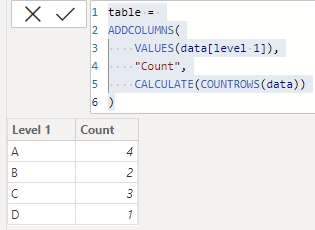
or you create a calculated table like:
Thanks! This helps.
hi @AdityaG
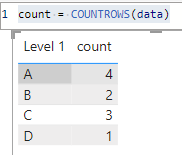
try to plot a table visual with level1 column and a measure like:
count = COUNTROWS(data)
it worked like:
I needed just like your 1st solution (which I've accepted), of adding a measured column to the table.
Check out the November 2025 Power BI update to learn about new features.
Advance your Data & AI career with 50 days of live learning, contests, hands-on challenges, study groups & certifications and more!
| User | Count |
|---|---|
| 21 | |
| 10 | |
| 9 | |
| 4 | |
| 4 |
| User | Count |
|---|---|
| 35 | |
| 31 | |
| 20 | |
| 13 | |
| 10 |